Myself and other vExperts were fortunate enough to receive a briefing from VMware about VMware Cloud Foundation 9 (VCF 9) and what’s new in this release. In this post, I’ll take you through some of the standout features from my perspective, along with as many screenshots as possible. Some of the content comes from VMware’s own marketing, but I’ll also share my insights as we go along.
- Why VMware Cloud Foundation 9 and Not 6?
- What is the Primary Stand Out in VCF 9?
- What Does an On-Premises Private Cloud Really Mean?
- How Has VMware Achieved This?
- What’s Changed with Licensing?
- What are the Innovations in VCF 9?
- Feature walkthroughs
- VMware Cloud Foundation Installer
- VCF Operations
- Single Sign-On (SSO)
- Centralised Certificate Management
- Password Management
- Configuration Management
- Fleet-level Tag Management
- Diagnostic Findings
- VCF Health
- Integrated Log Operations
- Integrated Network Operations
- Storage Operations
- Security Operations
- Workload Mobility
- Audit Events
- Application Insights and Troubleshooting
- VCF Automation
- Native Multi-Tenancy (VPC)
- Wrapping-Up: Why VCF 9 Delivers the Modern Private Cloud
- Final Thoughts
Why VMware Cloud Foundation 9 and Not 6?
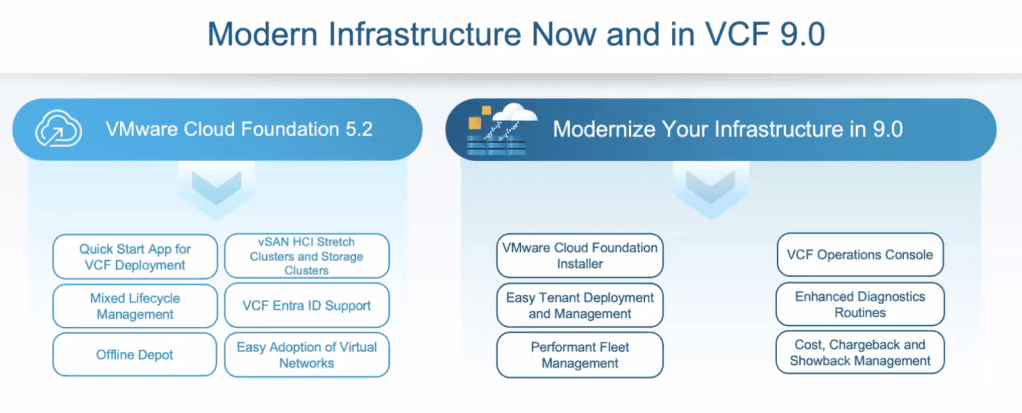
Let’s start with the most obvious question — why jump from version 5.2 to 9?
VMware Cloud Foundation is a platform built from several core VMware components, including vSphere ESXi, vCenter, NSX, and Aria — each with its own versioning. With VCF 9, VMware has aligned version numbers across the stack. So, for example, VCF 9 includes ESXi 9, NSX 9, and so on. This alignment helps reduce confusion and presents a more unified platform versioning approach.
What is the Primary Stand Out in VCF 9?
From my perspective, the biggest change is the move towards a truly unified platform. VCF 9 brings together vSphere, NSX, vSAN, Aria Automation, Aria Operations, and SDDC Manager in a way that feels cohesive — no longer a bundle of separate products, but a single, integrated experience designed to bring the public cloud feel on-premises.
Having worked with several on-premises cloud solutions from other vendors, VMware appears to have ticked the right boxes where others have struggled. It finally feels like VMware is delivering on the promise of a private cloud that mirrors the experience users have come to expect from public cloud providers.

What Does an On-Premises Private Cloud Really Mean?
It’s all about user experience.
A private cloud should enable users to deploy and manage infrastructure in a way that feels familiar and intuitive — like working in the public cloud. This means:
- The ability to deploy both virtual machines and containers as first-class citizens.
- Self-service capabilities, including provisioning databases and other resources.
- Control over network segmentation and tenant isolation.
- Easy application and environment/infrastructure scaling.
How Has VMware Achieved This?
The user experience has been completely re-architected. Instead of having to jump between multiple portals, VCF 9 now offers two primary user interfaces (or you can use the API):
- VCF Operations – for Cloud Admins
- VCF Automation – for private cloud Consumers

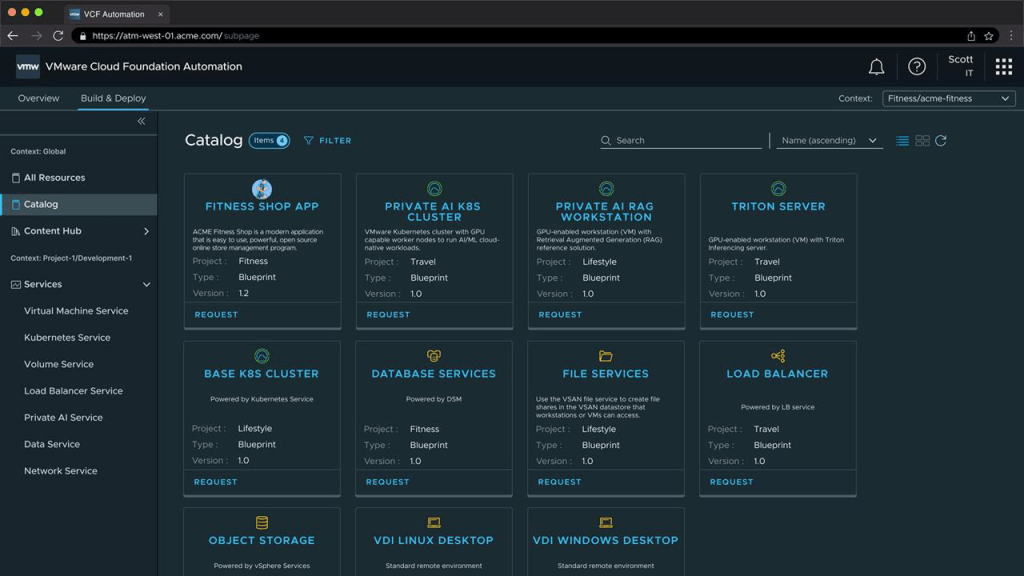
This streamlining is a huge step forward and should reduce operational overhead and complexity.
What’s Changed with Licensing?
Licensing has also been overhauled. VCF 9 now uses a single licence key, which is generated and signed by Broadcom. This has some notable implications:
- VCF Operations handles licence assignment across your environment.
- If you exceed your licensed entitlement, additional hosts are given a 90-day evaluation licence, giving you time to either acquire more cores or decommission other hosts.
- If the licence key is leaked or misused, it’s traceable to the original owner.
What are the Innovations in VCF 9?
🌐 Unified User Interface
As mentioned earlier, VCF 9 replaces multiple disjointed tools with just two user-focused portals:
- VCF Operations – for platform administrators
- VCF Automation – for consumers and developers
This shift brings clarity, consistency, and efficiency, streamlining the entire user experience. It’s a move that finally makes on-prem feel more like public cloud in terms of usability and accessibility.
💾 Lower Storage TCO with vSAN ESA Global Dedupe
vSAN ESA now supports cluster-wide deduplication, not just within disk groups. This addresses one of the biggest gaps in ESA since its launch — reducing storage costs and improving efficiency at scale.
🚀 Enhanced Switching Performance with ESX Enhanced Data Path
Significant improvements in network performance for modern workloads, delivering up to 3x the switching performance.
🧠 Negligible AI Performance Overhead
Running AI/LLM workloads on VCF 9 introduces only negligible overhead compared to bare metal — a strong message to customers looking to adopt private AI infrastructure without compromise. Checkout Broadcom Delivers Near Bare-Metal Performance for Virtualized AI/ML – VMware Cloud Foundation (VCF) Blog for more informaiton.
🔄 vMotion for AI – Sub 2-Second Live Migration for vGPU VMs
This is huge: historically, migrating VMs with GPUs meant minutes of stun time. Now, vGPU-backed VMs can live migrate in under two seconds, giving AI workloads the agility and resilience they desperately need in enterprise environments.
Feature walkthroughs
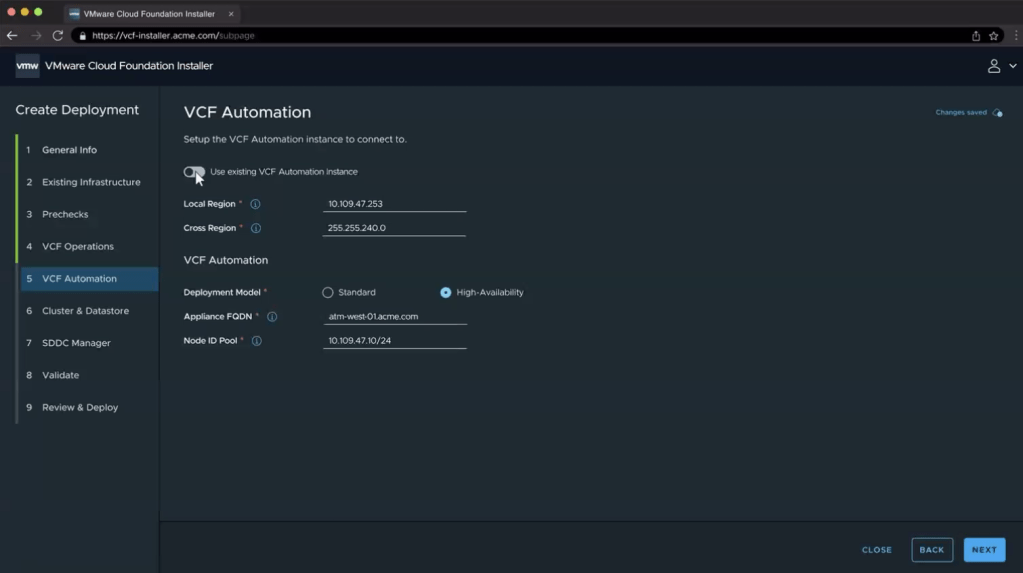
In this section, I’ll break down some of the new and noteworthy elements in VMware Cloud Foundation 9, starting with the VMware Cloud Foundation Installer.
VMware Cloud Foundation Installer
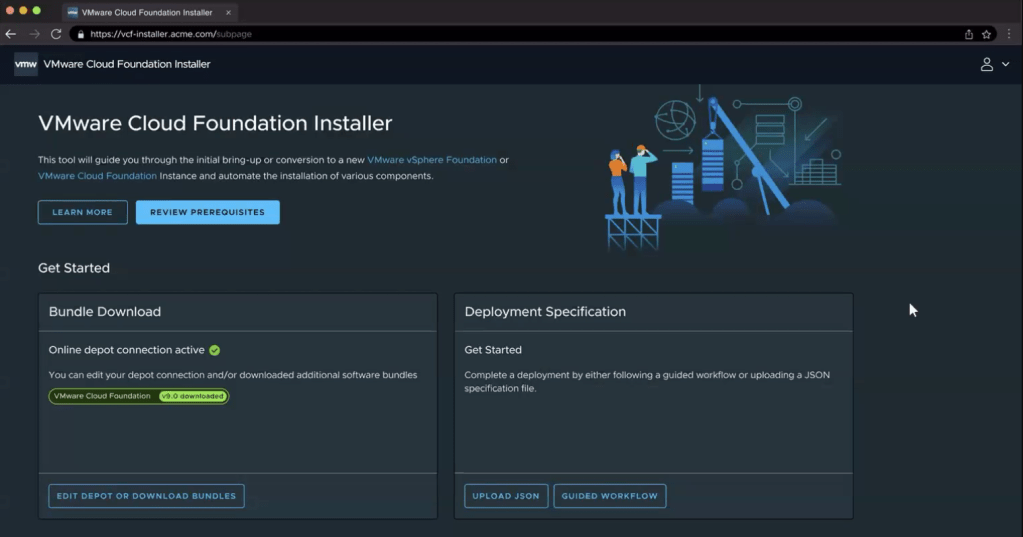
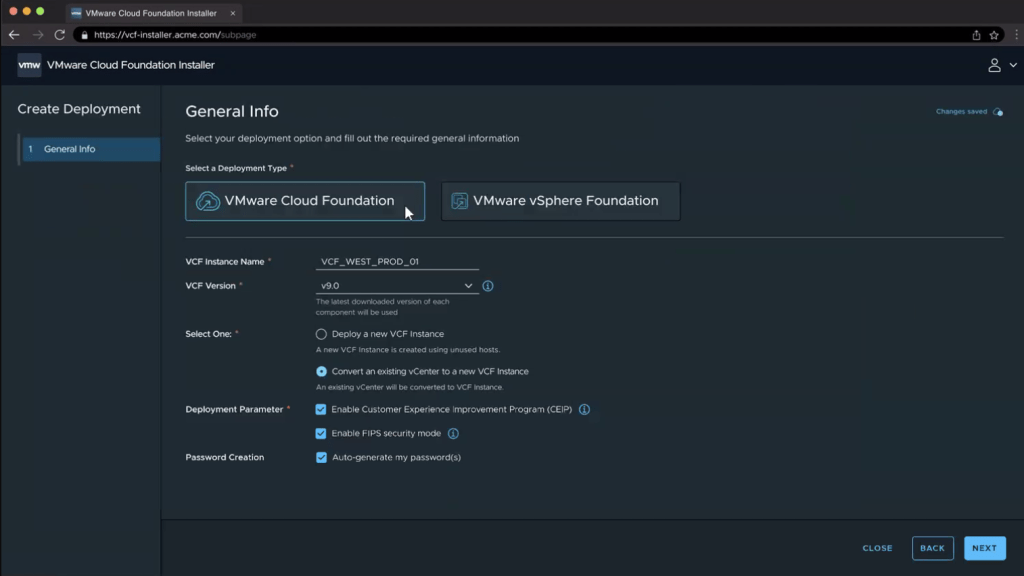
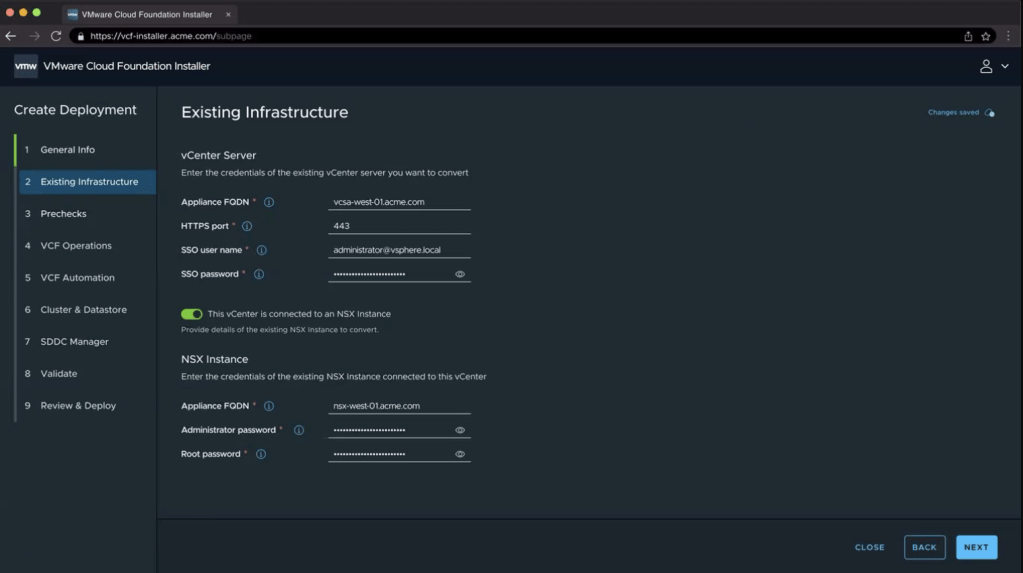
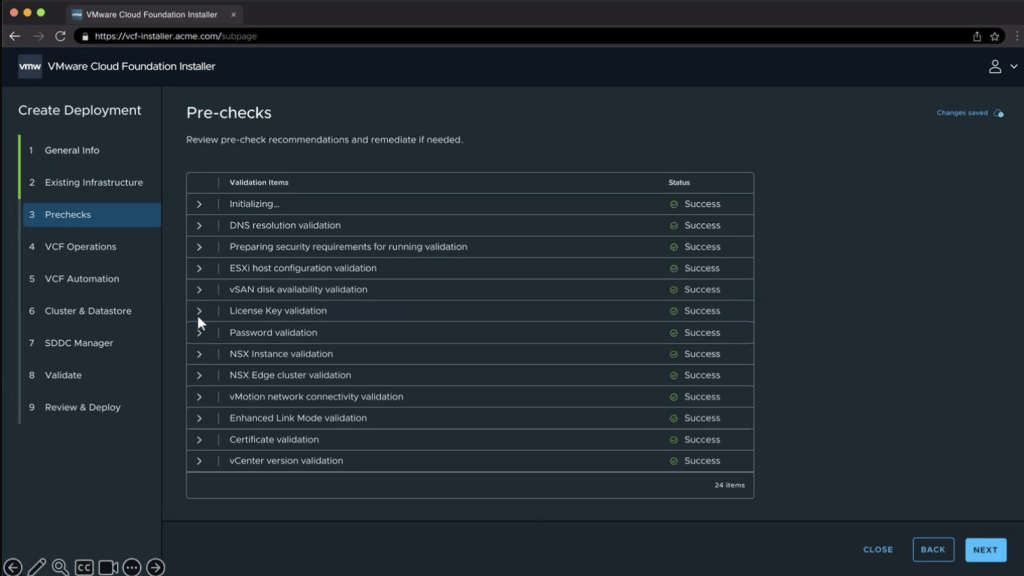
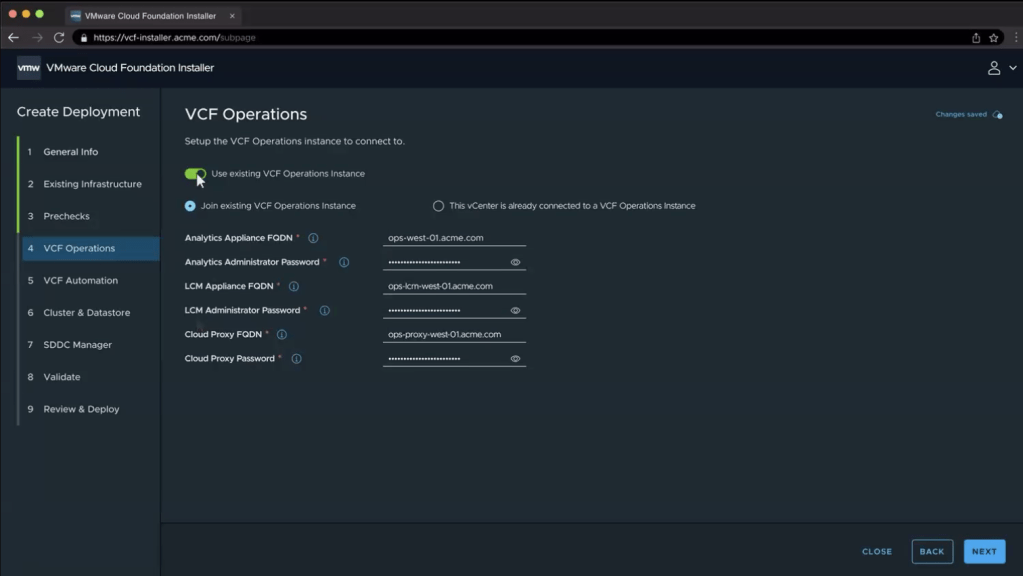
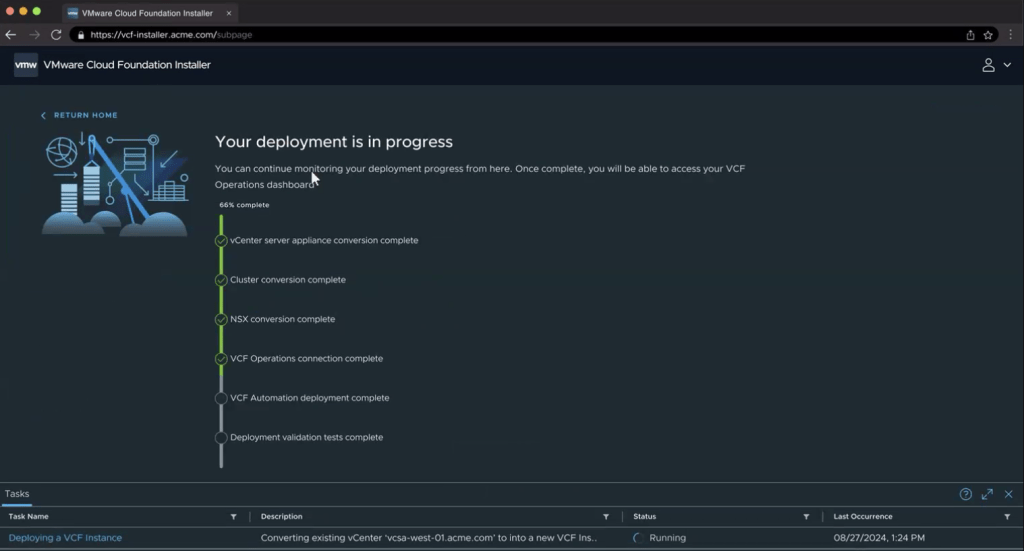
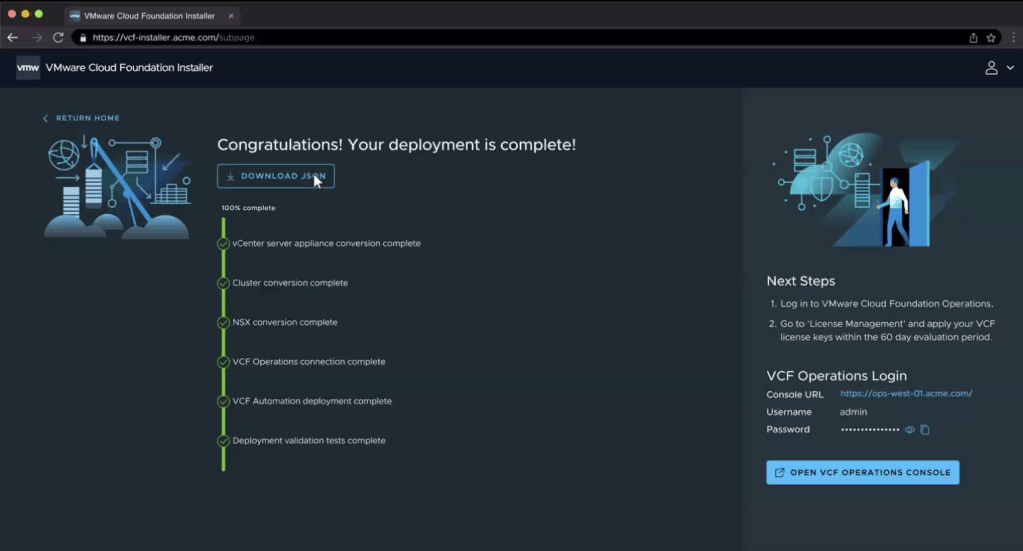
The VMware Cloud Foundation Installer is the direct replacement for Cloud Builder used in VCF 5.2. As with the previous tool, it’s deployed as an OVA appliance, but now with enhancements aimed at streamlining the deployment process.
This tool is designed to:
- Simplify the deployment of both VCF and VVF — whether from scratch or importing an existing environment.
- Eliminate the need to manually install each VCF component (like vSphere, NSX, etc.).
- Reduce deployment risk by using validated, repeatable topologies.
With this updated installer, VMware has focused on making the process faster, more predictable, and better aligned with enterprise expectations for automation and consistency.
VCF Operations
What was Aria Operation has now become VMware Cloud Foundation Operations (VCF Operations). It is no longer just about monitoring, but is now about the fleet management along side monitoring statics. Think combining SDDC manager with Aria Operations and some. For example, lifting tasks that you would have done at the individual platform level and lifting it up to the fleet level, including:
- Identity Management
- Certificate Management
- Password Management
- Configuration Management
- Tag Management
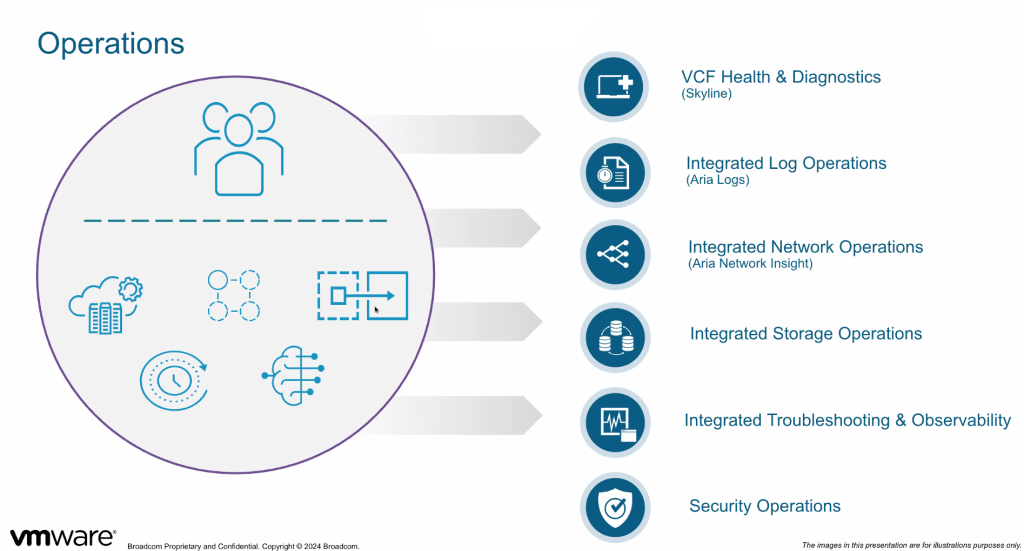
The diagram below illustrates the VMware Cloud Foundation (VCF) components that have been consolidated to form VCF Operations, providing a unified approach to operational management across the stack.
VMware consider the Customer Benefits as follows
- Quick Deployment & Governance: Accelerate setup and manage costs with policy enforcement.
- Proactive Security & Insights: Optimize performance with diagnostics and analyse application behaviour.
- Simplified Management & Lifecycle: Centralize control for upgrades, SSO, and identity management.
Now lets take a look at some of the screenshots
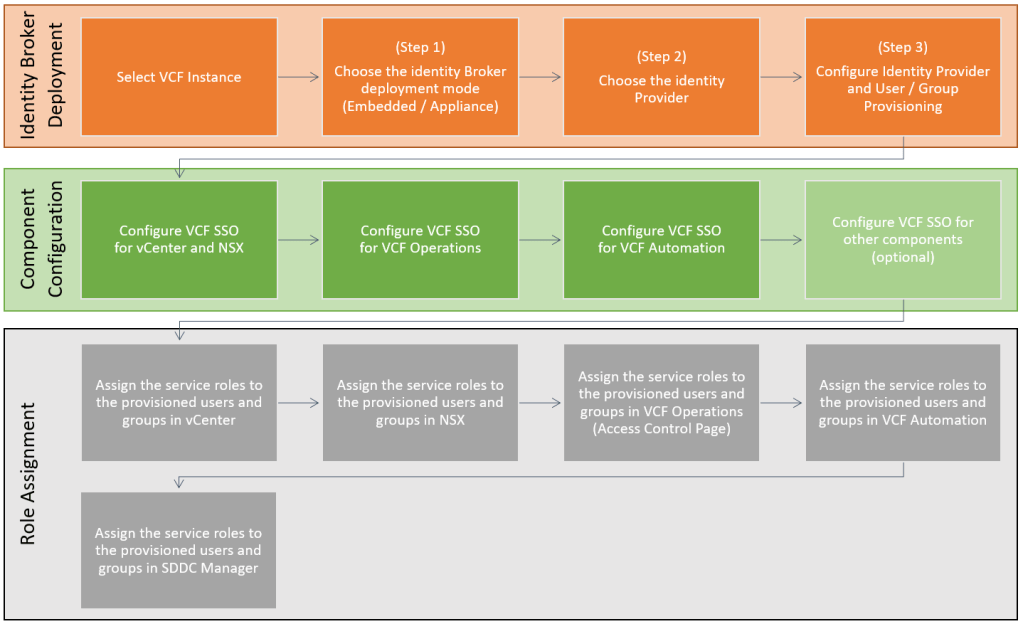
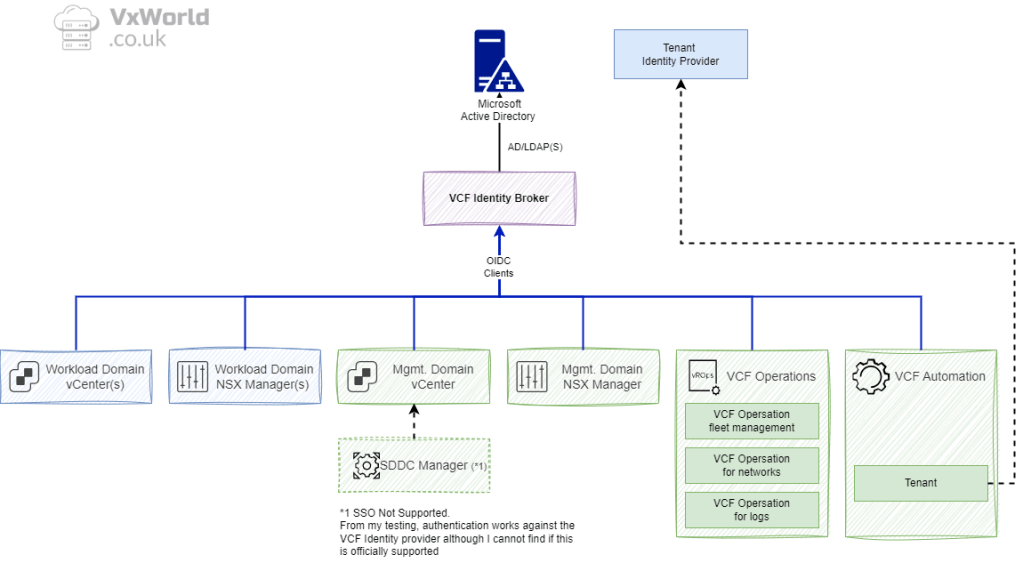
Single Sign-On (SSO)
VMware Cloud Foundation (VCF) 9 introduces several enhancements to Single Sign-On (SSO) capabilities, improving flexibility, resilience, and interoperability across the platform:
- Configurable Identity Federation for VCF – Choose between using the embedded identity broker within vCenter or deploying an external broker through VCF Operations, depending on your operational and security requirements.
- Unified SSO for the VCF Stack – Provides seamless authentication across all VCF components, streamlining user access and management.
- High Availability for Identity Broker – Supports multiple VCF Identity Broker deployments to enable geo-redundancy and meet availability or compliance use cases.
- Service Accounts for Inter-Component Communication – Introduces service accounts to eliminate password expiry issues, ensuring reliable and secure communication between VCF services.
- Integration with Industry-Standard Identity Providers (IdPs) – Offers out-of-the-box support for popular IdPs such as Okta, Ping Identity, and others, enabling alignment with enterprise authentication strategies.

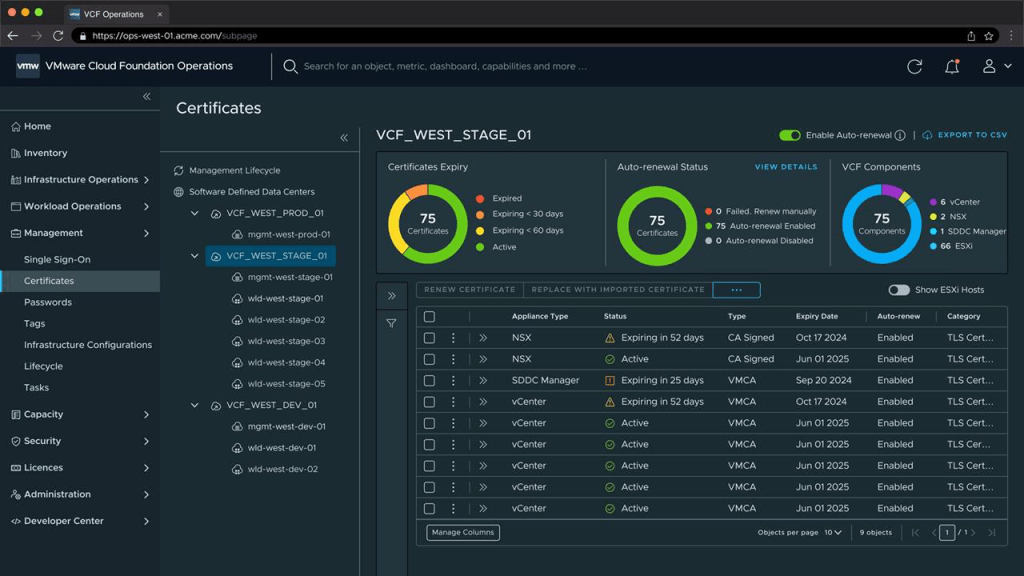
Centralised Certificate Management
VMware Cloud Foundation (VCF) 9 introduces a comprehensive set of centralised certificate management capabilities, designed to streamline and secure TLS certificate handling across the VCF stack:
- Unified Certificate Visibility – Gain a single pane of glass view into the TLS certificates used by all VCF components, simplifying compliance and lifecycle operations.
- Built-in Expiry Alerts – Receive out-of-the-box alerts for upcoming certificate expirations, reducing the risk of unexpected service disruption due to expired certificates.
- Automated Certificate Renewal – Take advantage of seamless, non-disruptive workflows to replace certificates issued by Microsoft Certificate Authority (CA), VMware Certificate Authority (VMCA) & OpenSSL-based CAs.
- Third-Party Certificate Support – Support for external trusted certificate authorities.
Password Management
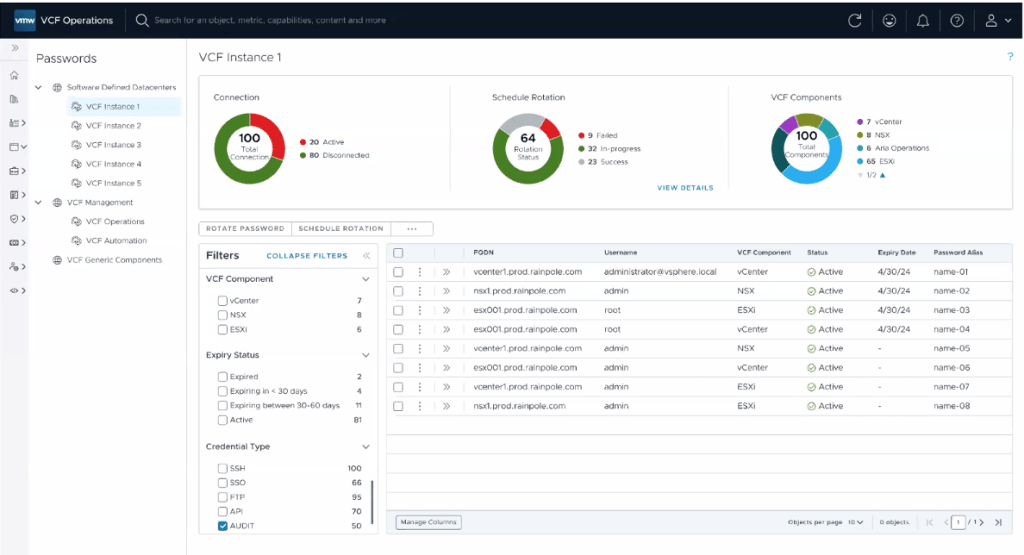
VMware Cloud Foundation (VCF) 9 brings significant improvements to password management, providing greater control, visibility, and automation across the platform:
- Centralised Local Account Management – Manage passwords for local accounts across VCF components from a single interface, improving operational visibility and consistency.
- Built-in Expiry Alerts – Out-of-the-box notifications for upcoming password expirations help administrators stay ahead of lifecycle tasks and avoid unexpected access issues.
- Automated Password Updates and Rotations – Simplify the process of updating and rotating passwords, reducing the risk of downtime and aligning with compliance and security best practices.
Configuration Management
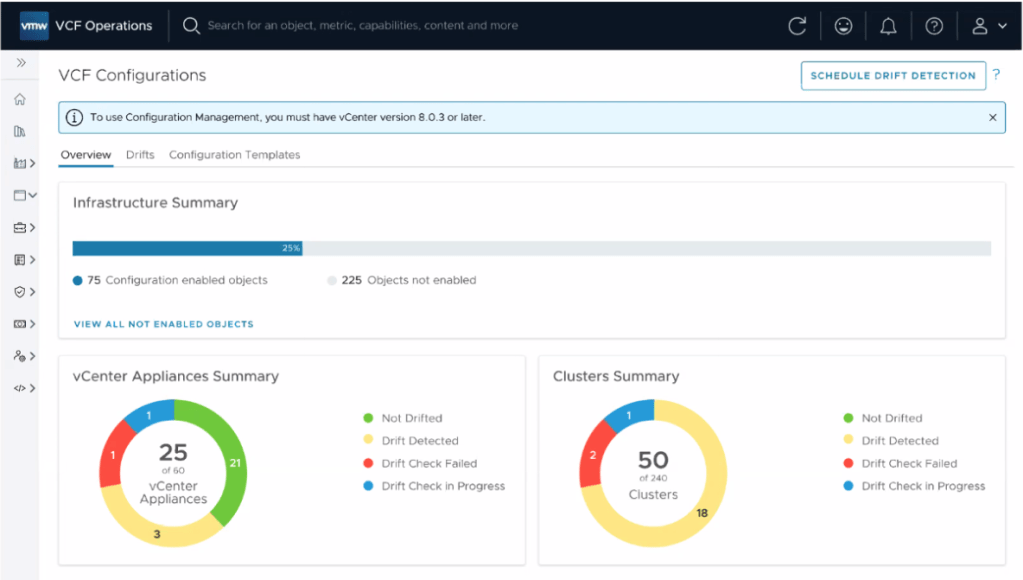
VMware Cloud Foundation (VCF) 9 introduces a powerful new configuration management capability, offering visibility and control over the configuration state of your environment. While the current release focuses on reporting-only functionality, it is understood that remediation features are planned for a future update. Even in its current form, this tool is a valuable asset for maintaining compliance and operational consistency.
Key features include:
- Configuration Drift Detection – Identify and summarise configuration drift across your environment, helping teams stay aligned with defined standards.
- vCenter Configuration Monitoring – Continuously monitor access and configuration changes to vCenter instances for better oversight.
- Desired State Templates – Define desired configuration states for vCenters using templates to ensure consistency across deployments.
- Policy-Based Reporting and Alerts – Receive notifications and generate reports based on custom policies, improving governance and audit readiness.
- Git Repository Integration – Integrate with Git for version control of configuration templates, enabling traceability and change management.
- Scheduled Drift Detection – Automate regular drift assessments using scheduled jobs to proactively identify deviations.
Fleet-level Tag Management
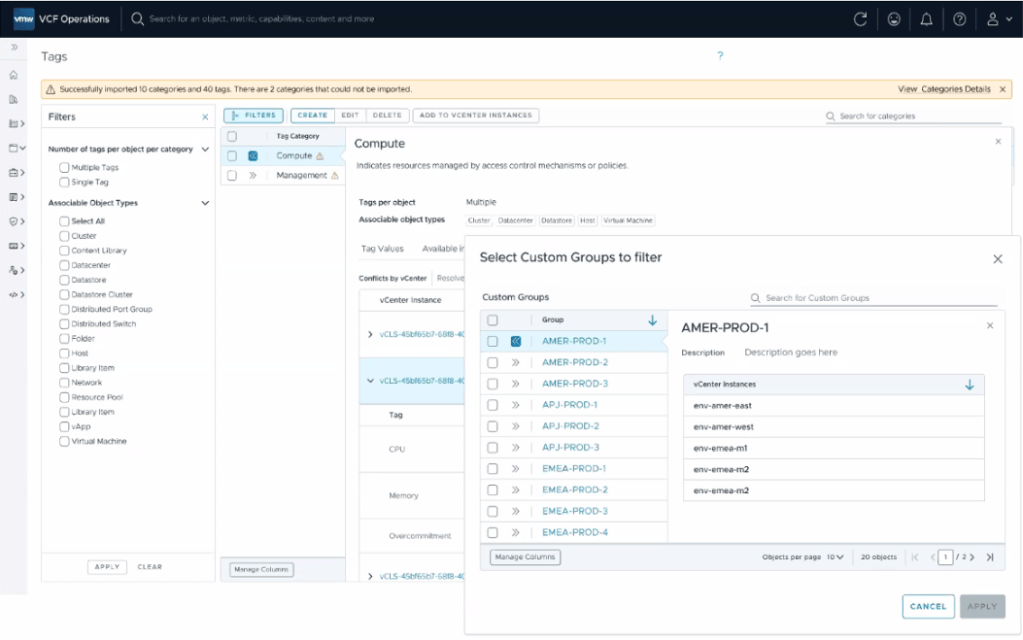
VMware Cloud Foundation (VCF) 9 introduces fleet-level tag management, bringing greater consistency and efficiency to how tags and categories are handled across multiple vCenters.
Key capabilities include:
- Centralised Tag Administration – Create, edit, and delete tag categories and individual tags from a single, unified interface, providing a true single pane of glass for tag management across your environment.
- Brownfield Tag Import and Conflict Evaluation – Seamlessly import existing (brownfield) tags and categories from connected vCenters, with built-in conflict detection and evaluation to ensure alignment.
- Tag Propagation Across vCenters – Push centrally defined tags and categories to multiple vCenters, ensuring consistency and standardisation across your entire VCF deployment.
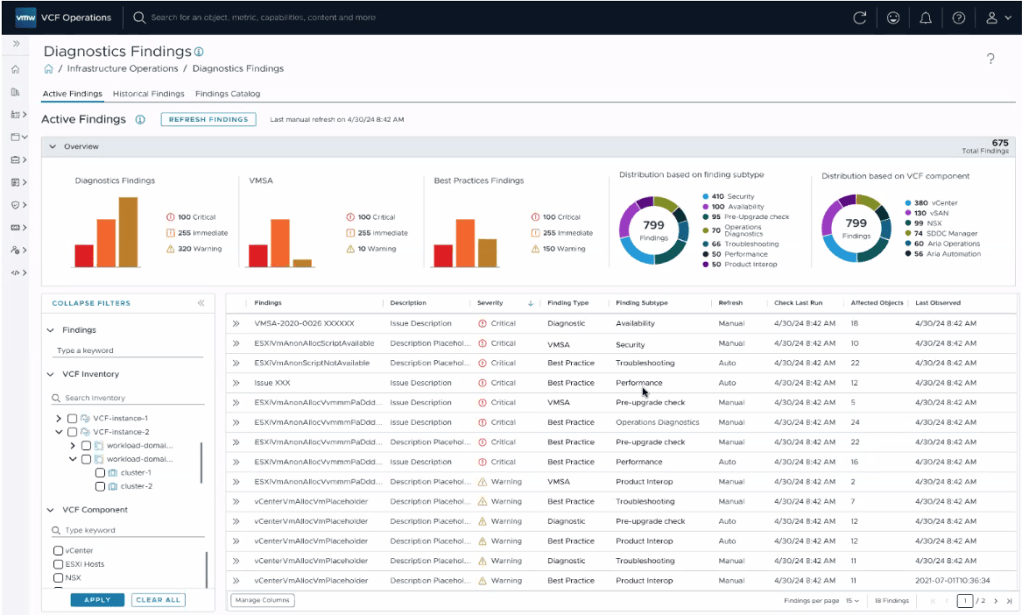
Diagnostic Findings
VCF 9 Operations includes Diagnostic Findings powered by Skyline, offering a centralised console for identifying known issues that may affect VMware Cloud Foundation components. This feature enhances operational awareness by:
- Identifying Known Issues – Automatically surfaces diagnostic insights relevant to your environment, helping teams proactively address potential problems.
- Highlighting Security Risks – View security vulnerabilities categorised by CVE (Common Vulnerabilities and Exposures), enabling faster prioritisation of risks.
- Impact Assessment – Understand which VCF components are affected and to what extent, giving operational teams the context needed to respond effectively.
- Curated Remediation Guidance – Access VMware-validated remediation steps tailored to each finding, streamlining issue resolution and improving platform resilience.
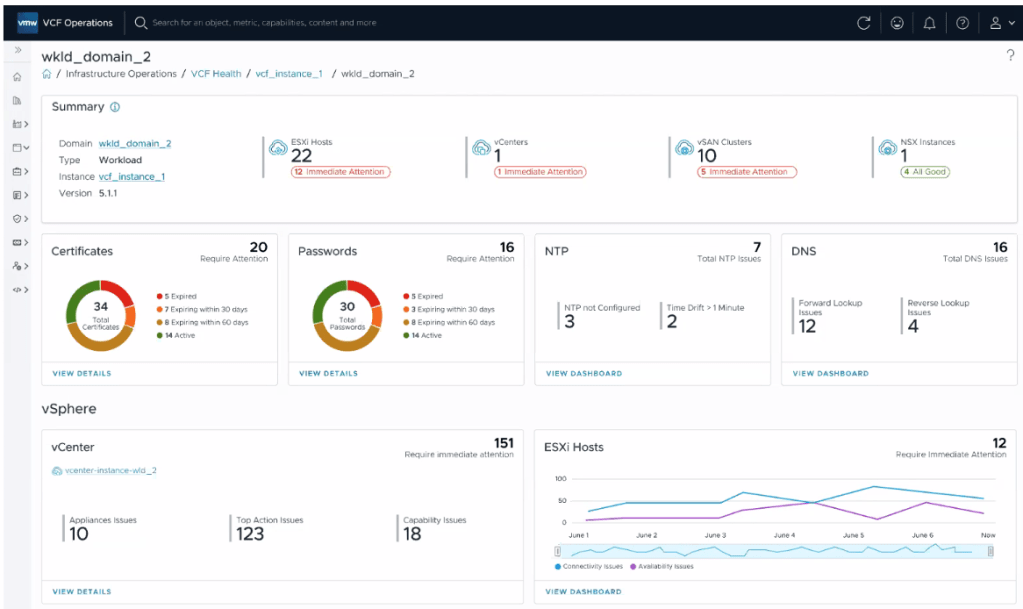
VCF Health
VCF 9 Operations includes VCF Health, a monitoring solution that provides visibility into the status of all VMware Cloud Foundation components. It helps reduce downtime and improve operational efficiency through:
- Centralised Health Monitoring – Gain a unified view of component health across the VCF stack, enabling rapid identification of issues.
- Proactive Alerts and Diagnostics – Minimise disruption with real-time alerts and intelligent diagnostics that detect problems before they impact services.
- Guided Root Cause Analysis – Leverage intuitive UI workflows and detailed runbooks to identify and resolve issues quickly and accurately.
- Integrated Support Workflows – Effortlessly generate and attach complete log bundles to support requests (SRs), streamlining engagement with VMware support.
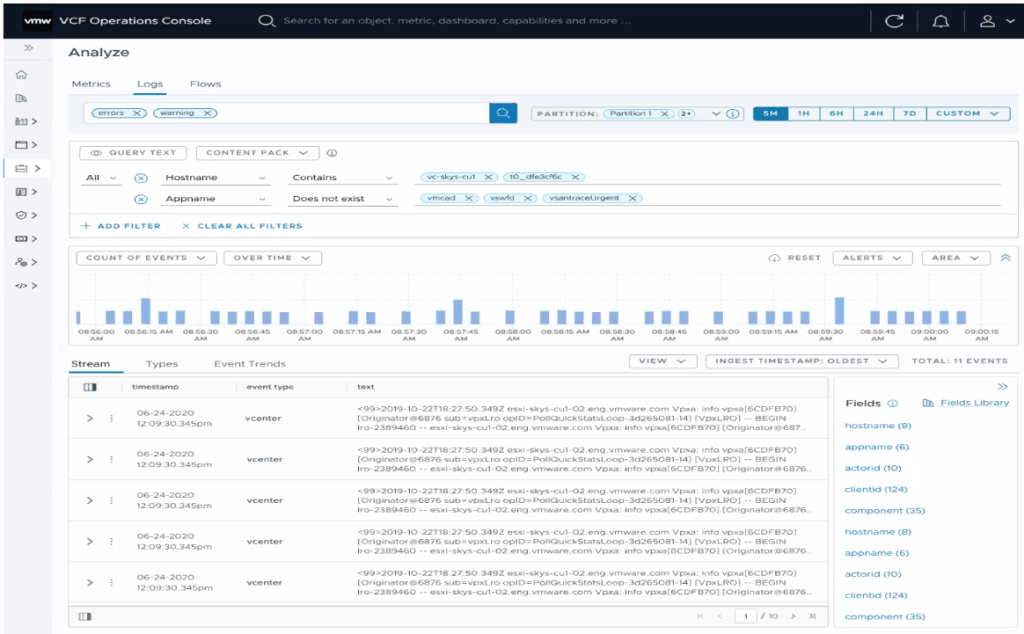
Integrated Log Operations
VCF 9 includes integrated log operations, enabling automatic collection of logs and events from all VCF components. Key capabilities include:
- Centralised log aggregation and analysis
- Custom queries and visualisation charts
- Alerting based on operational data, including logs
This integration streamlines troubleshooting and improves observability across the VCF environment.
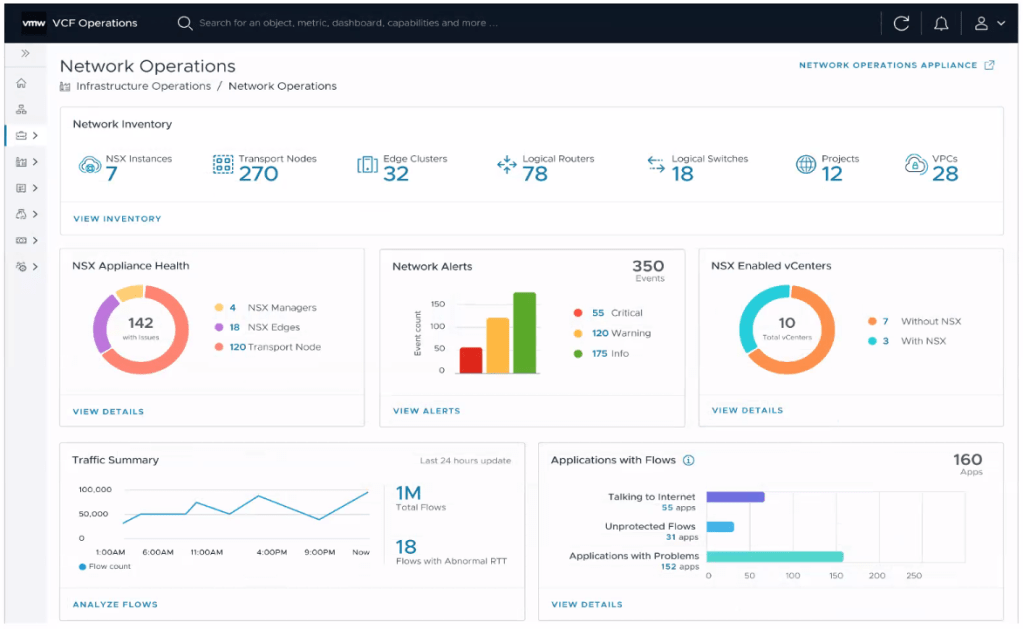
Integrated Network Operations
VCF 9 introduces integrated network operations, offering a unified view of the entire VCF network landscape. Key features include:
- Network inventory visibility
- Health monitoring of network components
- Traffic summaries and flow analysis
- Application-level network insights
This comprehensive view accelerates troubleshooting and enhances understanding of traffic patterns through deep flow insights.
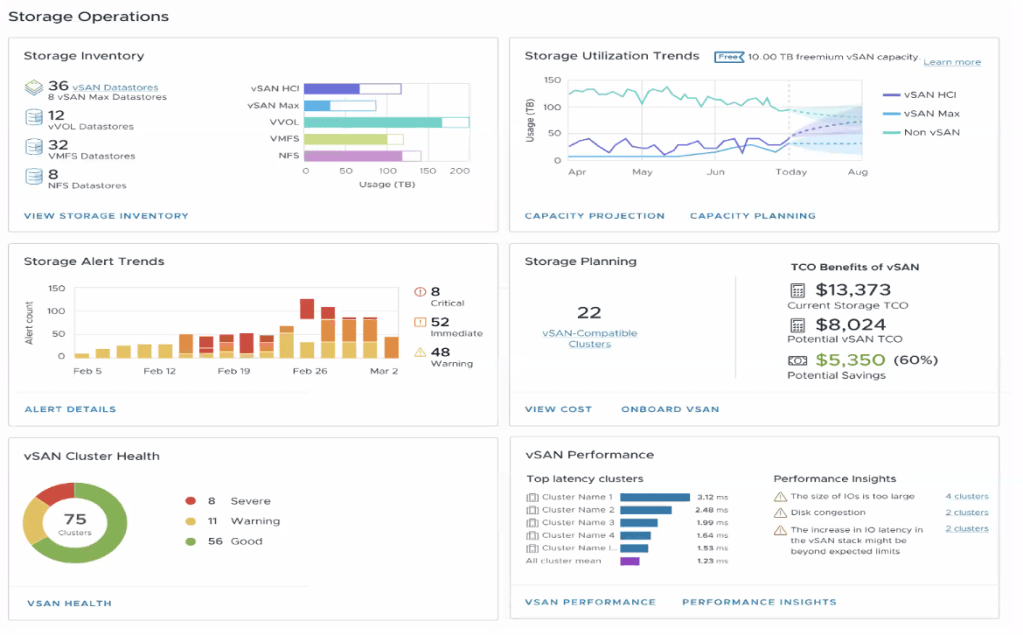
Storage Operations
VCF 9 provides a federated view of storage operations, covering both vSAN and non-vSAN environments. Key capabilities include:
- Unified visibility of all storage components
- Health checks for vSAN clusters with guided remediation
- Performance issue detection with root cause analysis
- Centralised view of alerts, health, and performance metrics
This single pane of glass enables proactive monitoring, reduces downtime, and helps optimise storage performance by identifying and resolving bottlenecks early.
Security Operations
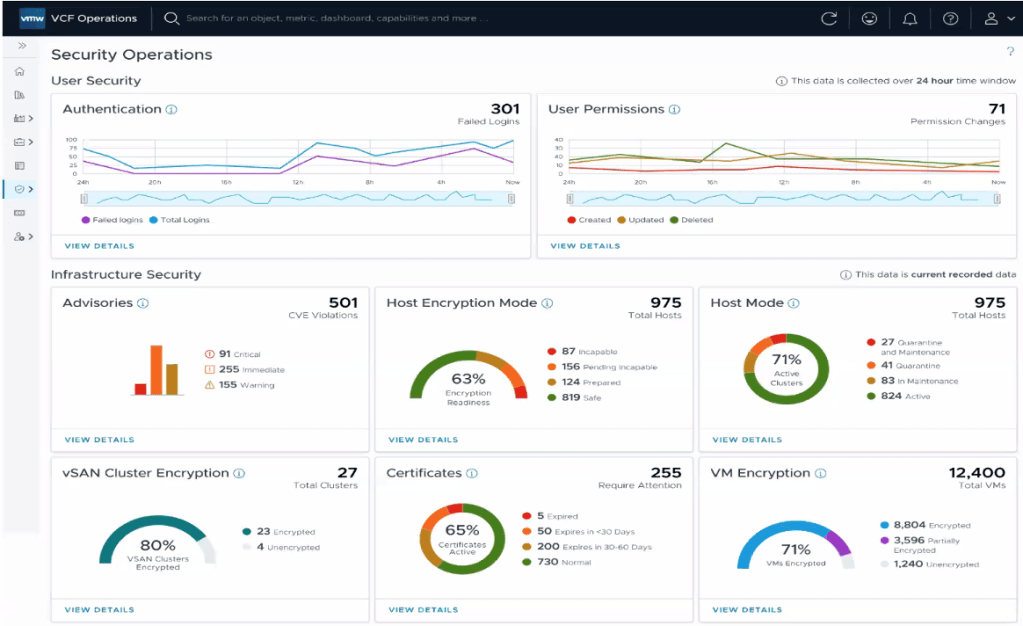
VCF 9 introduces Security Operations, offering a holistic view of an organisation’s security posture across all VCF deployments. Key benefits include:
- Overview Dashboard – A single pane of glass summarising user and infrastructure security metrics.
- Enhanced Visibility – Consolidated insights improve situational awareness and resilience.
- Proactive Defences – Early-warning indicators help teams address threats before they escalate.
- Posture Management – Continuous assessment of deployment configurations ensures alignment with security best practices.
These capabilities enable faster, more informed responses to vulnerabilities and strengthen overall platform security.
Workload Mobility
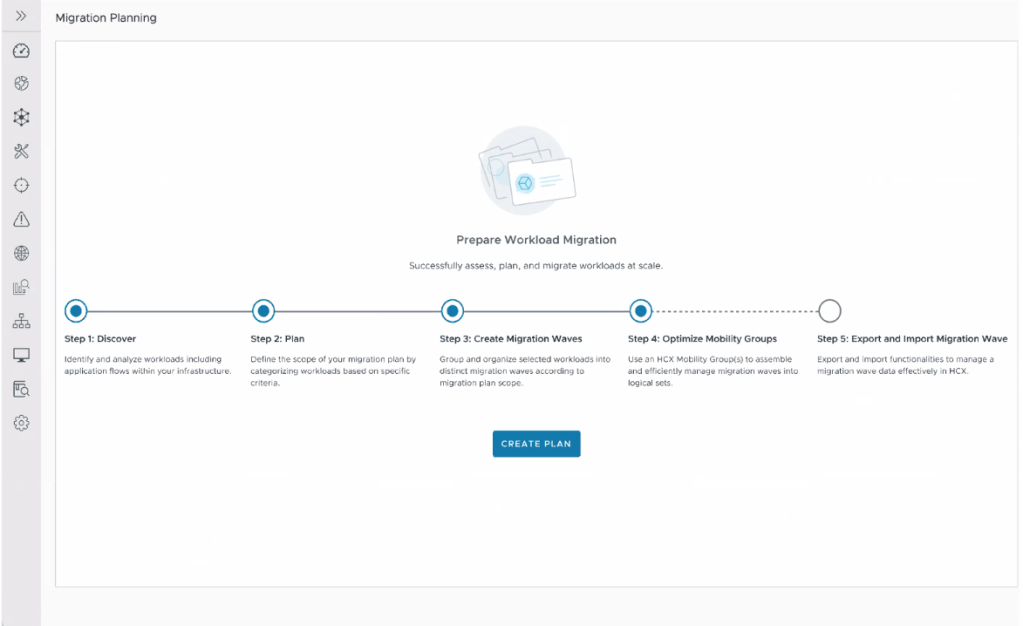
VCF 9 natively integrates VMware HCX, enabling seamless workload mobility across environments. It supports:
- Compute and network discovery
- Application identification and dependency mapping (via network flows)
- Migration planning and execution
Audit Events
VCF 9 enhances audit visibility with a unified view of audit events across vCenter resources. Key features include:
- Categorised Audit Events – Track events across key areas such as Authentication, Authorisation, Permissions, Network, and Firewall.
- User Action Traceability – Monitor and trace user activities for accountability and security.
- Integrated Audit Experience – Seamless access to audit data across vCenters improves usability and oversight.
- Enhanced Monitoring – Strengthens security, supports compliance, and boosts operational effectiveness.
These capabilities help organisations maintain control and transparency across their VCF environments.

Application Insights and Troubleshooting
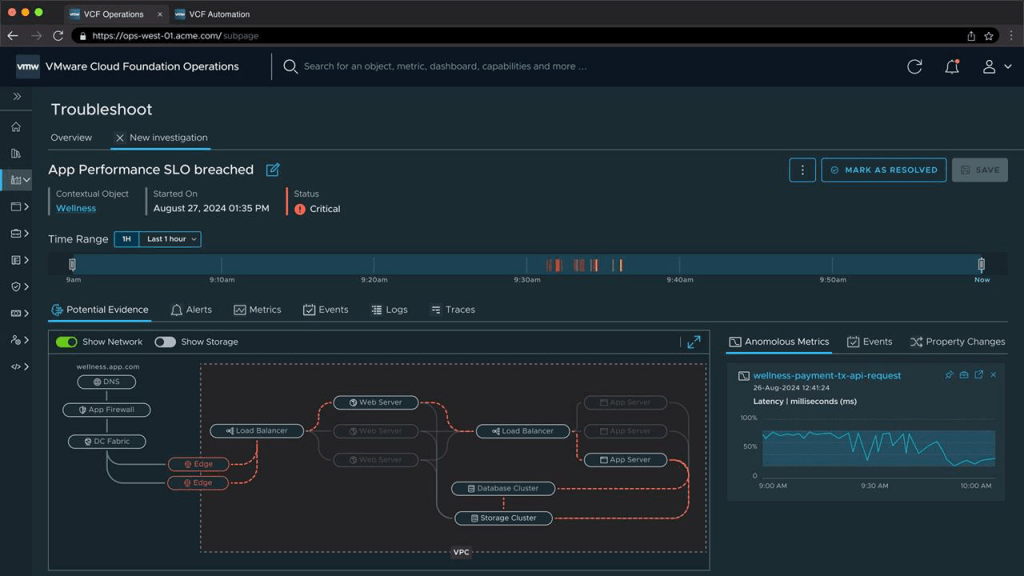
VCF 9 enhances operational resilience with intelligent application insights, guided troubleshooting, and automated remediation—enabling faster recovery and minimal disruption.
- Proactive Issue Detection – Detect potential issues early through intelligent timeline analysis, helping teams respond before they escalate.
- Resilient Troubleshooting – Rapidly isolate affected components and reduce downtime with intuitive, guided workflows.
- Accelerated Recovery – Restore services quickly using automated remediation powered by pre-built runbooks and recovery workflows.
These capabilities empower operations teams to maintain application availability, minimise impact, and ensure seamless user experiences.
VCF Automation
VCF Automation serves as the user-facing portal for consuming VMware Cloud Foundation, delivering a true cloud experience. It enables self-service provisioning of VMs, containers, Kubernetes clusters, databases, and more—streamlining consumption for developers and operators alike.
- Self-Service Portal – Empower users to deploy and manage resources through an intuitive interface.
- End-to-End Automation – Automates the full deployment process, reducing complexity and time-to-value.
- Aria Upgrade – If you already use Aria Automation, it becomes VCF Automation 9, fully integrated into the VCF stack.
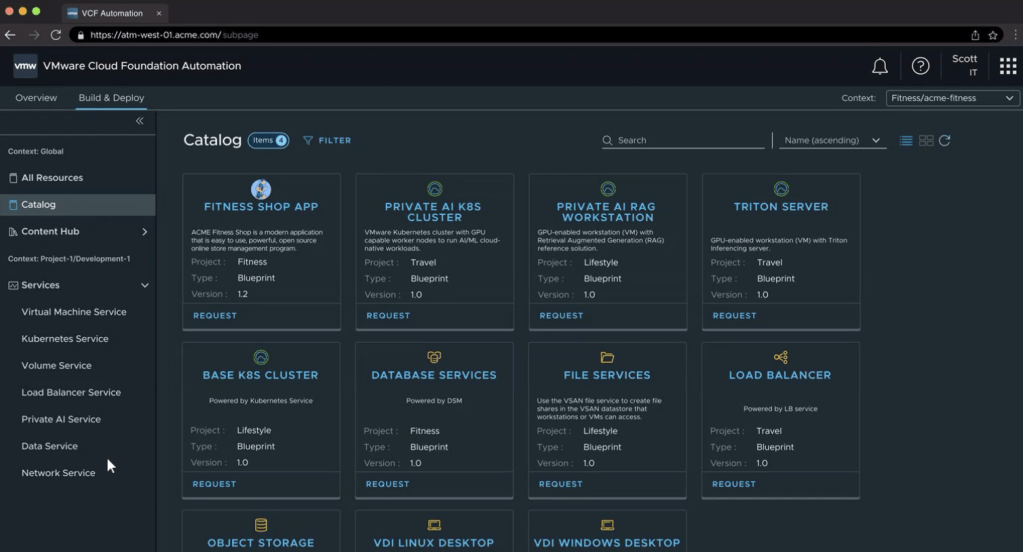
Let’s walk through an example of deploying an application using the VCF Automation Catalog.
The process begins with the end user accessing a curated catalog of deployment options. As an administrator, you can define and expose specific parameters—such as VM size, environment, storage class, or region—that users can customise during deployment.
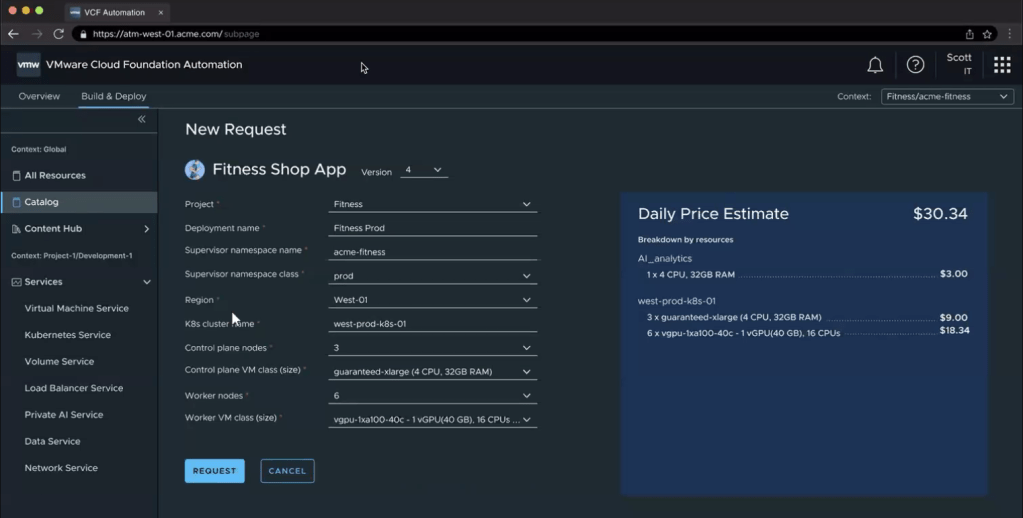
Additionally, cost transparency is built into the experience. End users can view the estimated cost of the workload before deployment, helping promote cost-awareness and accountability across teams.
This self-service model simplifies application provisioning while ensuring alignment with organisational policies, budgets, and infrastructure standards.
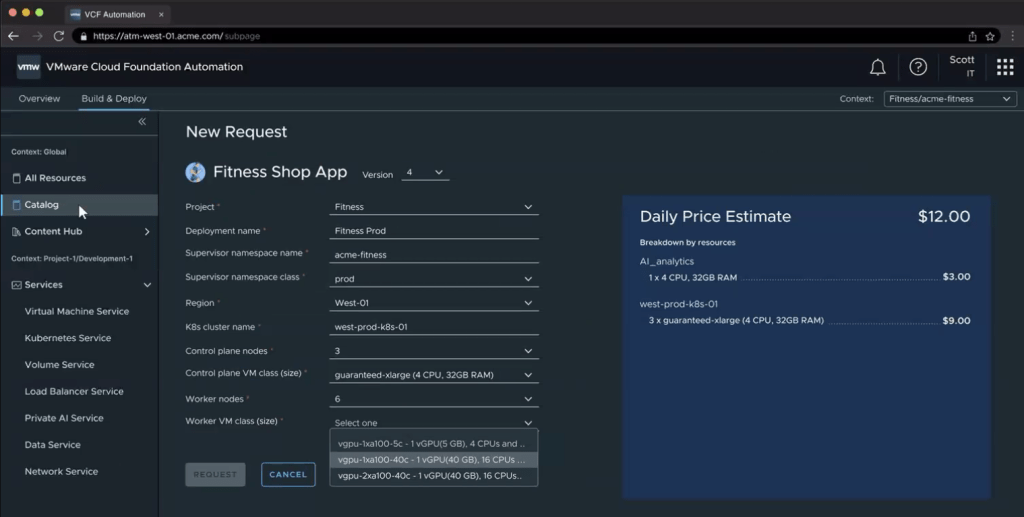
As shown, the price dynamically updates based on the selected VM Class, providing users with real-time cost visibility during the deployment process.
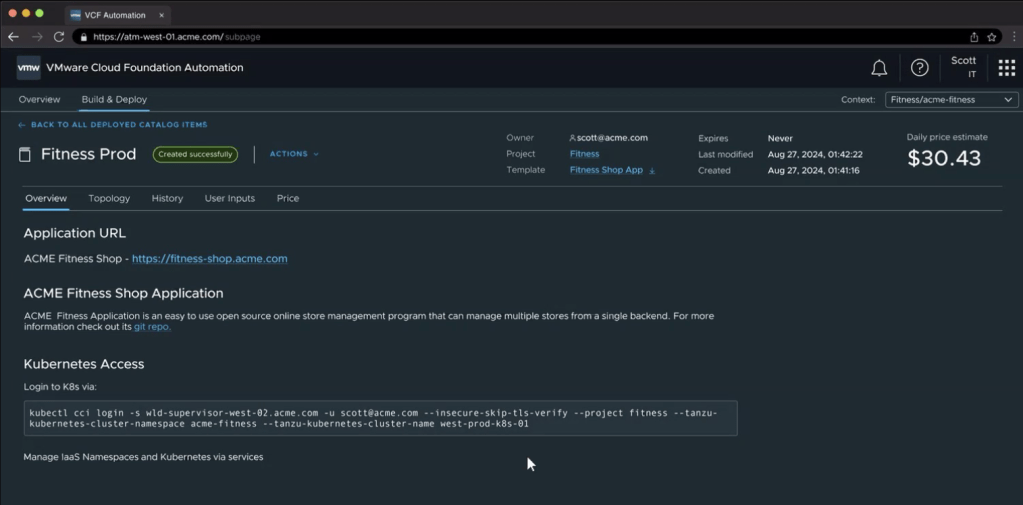
Once the deployment is complete, the results display the application URL along with other key connection details, allowing users to easily access the underlying infrastructure supporting the application.
Native Multi-Tenancy (VPC)
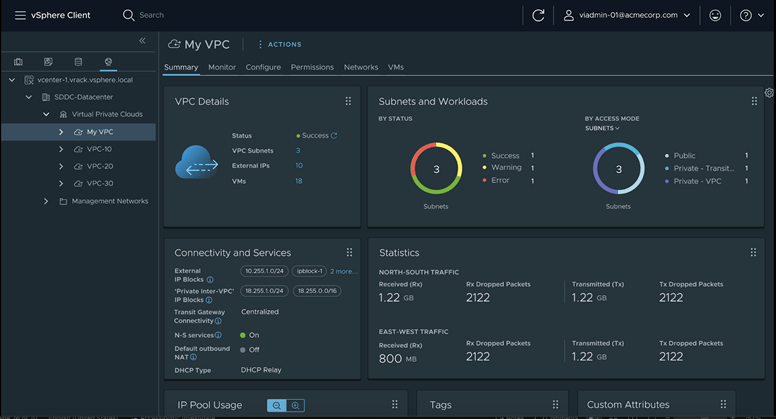
VCF 9 adds native Virtual Private Cloud (VPC) capabilities, delivering true multi-tenancy while keeping operations simple and cost-effective:
- Operational efficiency for connectivity – Connect, segment, secure and protect workloads directly within VCF, without extra tooling.
- Resource efficiency – Consolidate workloads into secure VPCs, reducing infrastructure costs through higher utilisation.
- Simplified multi-tenancy – Isolate network traffic and apply tenant-specific policies in just a few clicks, ensuring strong separation and streamlined management.
These VPC features let teams deliver self-contained, secure environments quickly, boosting agility without sacrificing governance or performance.
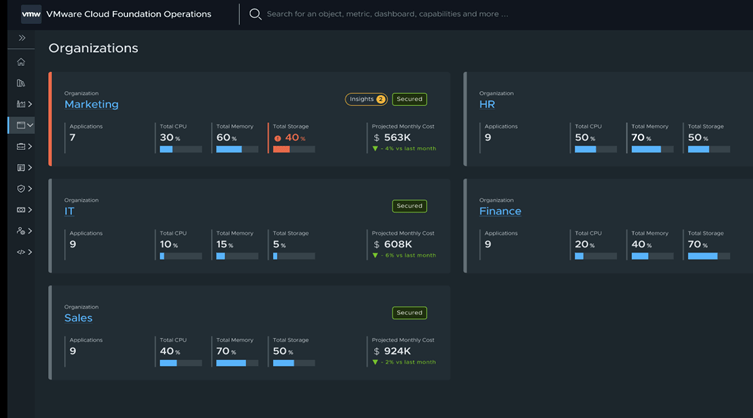
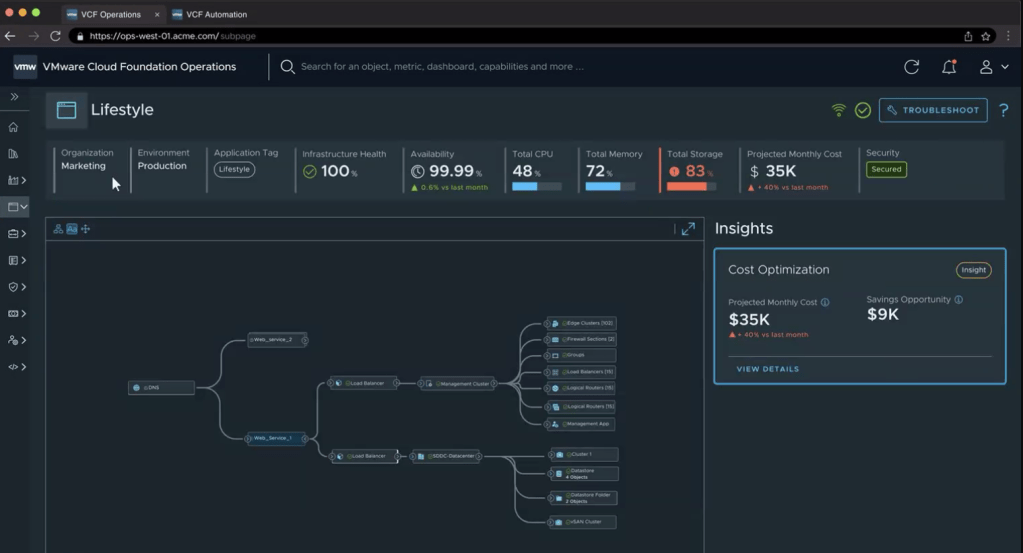
The VCF Operations Dashboards provide a centralised, intuitive view into your VMware Cloud Foundation environment, enabling teams to:
- Increased Operational Efficiency and Reduced Overhead
- Optimized Resource Allocations and Cost Savings
- Easily Scale Tenants and Monitor Cost and Chargeback
Some of these operational and cost metrics are also surfaced within VCF Automation, giving end users direct visibility into resource consumption, performance, and estimated costs—enhancing transparency and empowering informed decision-making.
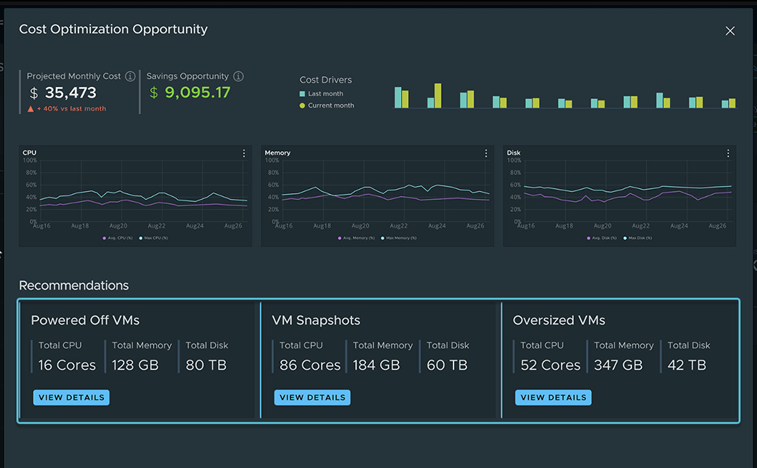
Cost Optimisation Opportunities are presented to the users.
In addition to organisation (tenant) view, VCF also provides application-level breakdowns, allowing users and operators to track resource usage, cost, and performance across all deployed applications.
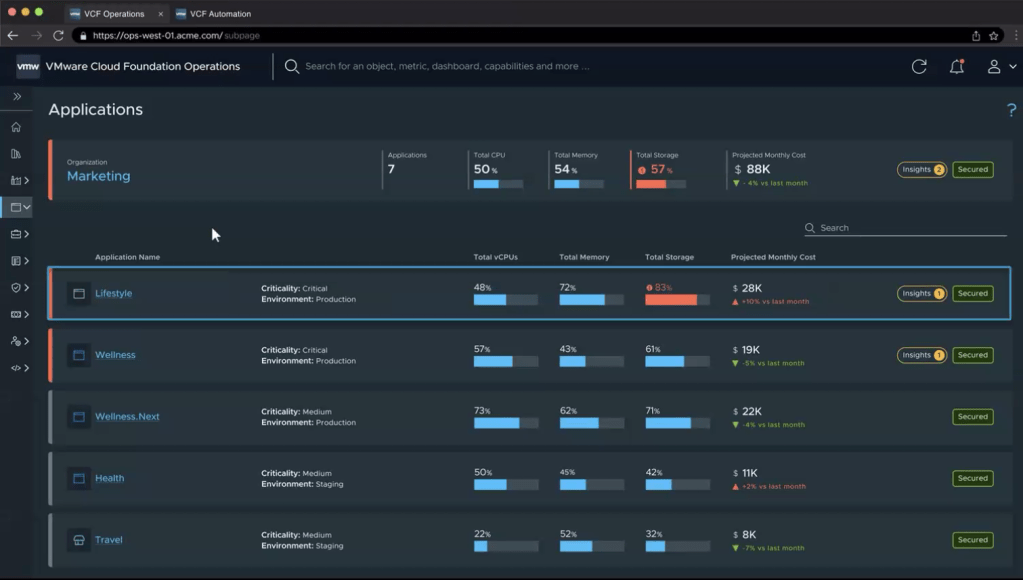
You can also gain application-level insights, revealing the typology and individual components that make up each application—such as virtual machines, containers, storage, and network dependencies.
Wrapping-Up: Why VCF 9 Delivers the Modern Private Cloud
VMware Cloud Foundation 9 is more than a simple version bump from 5.2—it is a reset of the platform. By aligning every building-block (vSphere, NSX, vSAN, Aria, SDDC Manager) to version 9, VMware removes historical confusion and presents VCF as a single, cohesive solution.
That cohesion is felt everywhere:
- Unified interfaces – Two clear portals—VCF Operations for platform admins and VCF Automation for consumers—replace a sprawl of disconnected tools, slashing operational overhead and bringing a genuine public-cloud feel on-premises.
- Enterprise Manageability – Native HCX workload mobility, fleet-wide tag and certificate management, centralised logging, multi-tenant VPCs, and deep security dashboards all live under the same roof.
VCF 9 doesn’t stop at usability; it pushes the technology envelope:
- vSAN ESA global dedupe cuts storage TCO.
- ESX Enhanced Data Path triples network throughput for modern workloads.
- Near-bare-metal AI performance and sub-two-second vMotion for vGPU VMs erase long-standing barriers to virtualising AI/ML.
All of this is surfaced through rich operational insights—from application-level troubleshooting to cost, charge-back and security posture tracking—so teams can act before issues bite.
Final Thoughts
I cannot wait to use VCF 9 in production. From everything I’ve seen and tested so far, it feels like VMware has finally delivered a private cloud experience that ticks all the right boxes. I am confident feedback from my customers will be positive, especially from those who have long wished for a unified, intuitive, on-premises private cloud.
The information shared in this blog post is based on pre-release marketing materials and early access content related to VMware Cloud Foundation 9. While every effort has been made to ensure accuracy, some features or capabilities described may differ from the final generally available (GA) release. For the most up-to-date and authoritative details, please refer to VMware’s official documentation and release notes.












 VxWorld
Leave a comment