
Earlier in the year I was studying for the VMware Certified Specialist – vSAN 2024 [v2] certification. One key part to understand is Storage Policies. Particularly how your choices impact the minimum number of hosts required and the amount of consumed raw disk space.
I wanted to share the resources I produced. These helped me understand data placement, minimum number of hosts and consumed raw space, ultimately contributed to passing the 5V0-22.23 exam.
Before I go any further, I want to recommend the amazing book VMware vSAN 8.0 U1 Express Storage Architecture Deep Dive. This book is written by Duncan Epping, Cormac Hogan, and Pete Koehler – all legends in vSAN!
To study for the exam, I read through the entire book. I also used resources on VMware’s website and referred to Duncan’s blog, Yellow Bricks. There is also the VMware vSAN: Install, Configure, Manage [V8] course available on demand or instructor led. However, I did not take this course so can’t comment on it.
So, why did I bother creating the diagrams you will see later in this post? I was unable to find diagrams for each Storage Policy. VMware vSAN 8.0 U1 Express Storage Architecture Deep Dive provided excellent examples. However, the authors described how it changes for different policies. I’m a visual learner. Having a diagram for each was critical for me to memorise these for the exam.
Before I dive into the diagrams, let’s first recap what are Storage Policies. Next, what is Failures to Tolerate and a Fault Domain. Then, we will briefly discuss RAID levels and how that applies to vSAN. Alternatively jump directly to the section of interest.
Background
What are Storage Policies?
In a traditional storage system you typically define a RAID level (e.g, RAID 1, RAID 5, RAID 6) for the entire set of disks (occasionally a subset). This results in a single logical block/volume of storage that multiple Virtual Machines (VM) can be stored on. This logical volume is often presented to the ESXi hosts over Fibre Channel, iSCSI, or NFS. All VM’s stored on this volume will have the same level of resilience (i.e., Failures to Tolerate). They also have the same storage performance.
RAID levels (e.g., RAID 1, RAID 5, RAID 6) offer different resilience and performance characteristics. They also consume different amounts of raw storage. Typically RAID 1 is more performant than RAID 5 or 6 but consumes more raw disk space. So with legacy storage, you need to make a compromise for all the VMs that will share it. Do you choose performance or disk space efficiency?
In contrast vSAN offer Storage Based Policy Management (SBPM) at the object level. This lets you to set the RAID level at the VM/object level (e.g., entire VM, virtual hard disk, VM home folder). For example, you can assign a RAID 1 policy to a database server that has a high I/O demand. Whilst setting RAID 5 to a web server. That said, vSAN ESA can achieve RAID 1 performance with RAID 5/6 . Giving you the best of both worlds!
Unlike the OSA, the vSAN ESA can deliver performance equal to or better than RAID-1 mirroring when using RAID-5/6 erasure coding. Customers can achieve guaranteed levels of space efficiency without any compromise in performance.
Performance Recommendations for vSAN ESA
Together with setting the RAID level, the Storage Policy lets you set the number of Failures to Tolerate. Lets explore what Failures to Tolerate is?
What is Failures To Tolerate?
Failures To Tolerate (FTT) describes the number of failures you can experience/tolerate and still have your data available. In a traditional storage architecture, RAID distributes the data across disks within a storage enclosure(s). In contrast, vSAN distributes the data across the hosts in the cluster. For example, if the policy was set to a FTT of 1. Should you experience a failure of a single host, the data will still be available. Should you experience a failure of a second host, your data will be unavailable.
Continuing with that example, it’s worth pointing out. If you put a host into Maintenance Mode, and do not do a ‘Full Data Migration’, it counts as one of your Failures to Tolerate. Should you then have a real failure, like a disk or a host failing, resulting in your second failure, your data would be unavailable.
vSAN supports up to FTT 3 using RAID 1 mirroring. Up to FTT 2 using erasure coding (RAID 6). Whilst RAID 5 erasure coding supports FTT 1.
In the example above, FTT referred to the number of hosts that can fail. You will find this is true in lots of VMware documentation and other blogs. It is also how I reference it in the diagrams at the end of this post. However, in reality when you see the word ‘host’, you should read Fault Domain in your head. I will quickly explain what a fault domain is within vSAN. This explanation should help you when reading other resources that also refer to ‘hosts’.
What is a Fault Domain?
A fault domain can be a single host (standard configuration), collection of hosts (e.g. in a rack) or a data centre (stretched cluster). There is a special case with a 2 node cluster. In this scenario, you have a fault domain per host (Primary and Secondary). You can also use nested fault domains (e.g. a fault domain per disk for ESA or disk group for OSA), more on that later.
As mentioned earlier, when you read ‘Host’ think Fault Domain as the same rules apply. Lets take the example of an ESA cluster and you want to use FTT 1 RAID 5. Without fault domain configured, each host is implicitly a fault domain. You will need a minimum of three hosts (2 + 1 Schema). If you want a collection of hosts (e.g. in a rack) to be a fault domain, you need at least three racks/fault domains. Each rack/fault domain must have the same number of hosts if you want to use all your capacity.
When you deploy a vSAN stretch cluster across two data centre’s, each data centre becomes a fault domain. This enables two levels of Failures to Tolerate. Firstly, Site Disaster Tolerance (also know as Primary Failures to Tolerate) that controls data replication (e.g., mirroring) across the two data centre’s. Secondly, Failures to Tolerate (also know as Secondary Failures to Tolerate) controls the number of failures to tolerate within the data centre.
When you deploy a 2 node cluster, this setup is similar to the vSAN stretched cluster discussed above. This enables two levels of Failures to Tolerate. Firstly, Site Disaster Tolerance (also know as Primary Failures to Tolerate) that controls data replication (e.g., mirroring) across the two hosts (each host is considered a site). Secondly, Failures to Tolerate (also know as Secondary Failures to Tolerate) controls the number of failures to tolerate within a host. This is a feature known as Nested Fault Domains. For more information on that read Duncan’s post, Are Nested Fault Domains supported with 2-node configurations with vSAN 8.0 ESA?
Next we are going to quickly recap the various RAID levels and how that translates to vSAN.
What is RAID 1
A quick reminder what RAID 1 is:
RAID 1, also known as “mirroring,” is a data storage technique used to increase redundancy and reliability. In a RAID 1 setup, data is duplicated across two or more hard drives. This means that any data written to one drive is automatically copied to the other(s). If one drive fails, the data remains accessible from the other drive(s), ensuring no data loss
ChatGPT
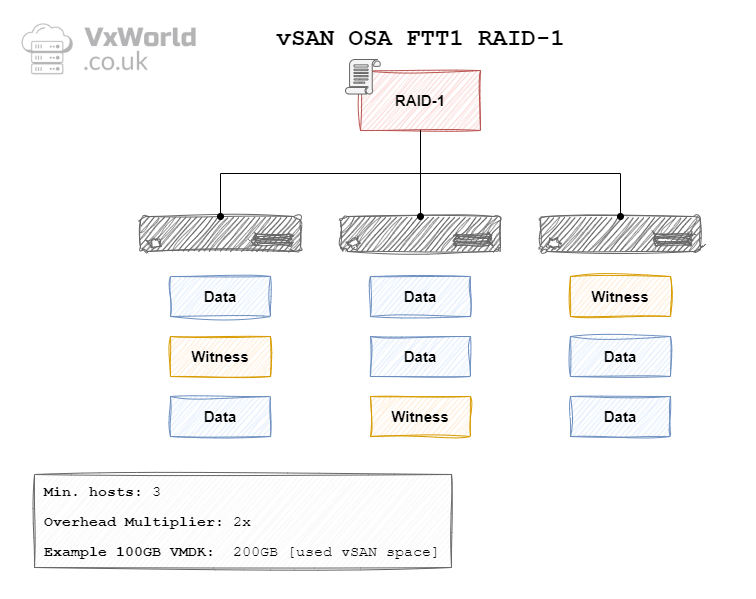
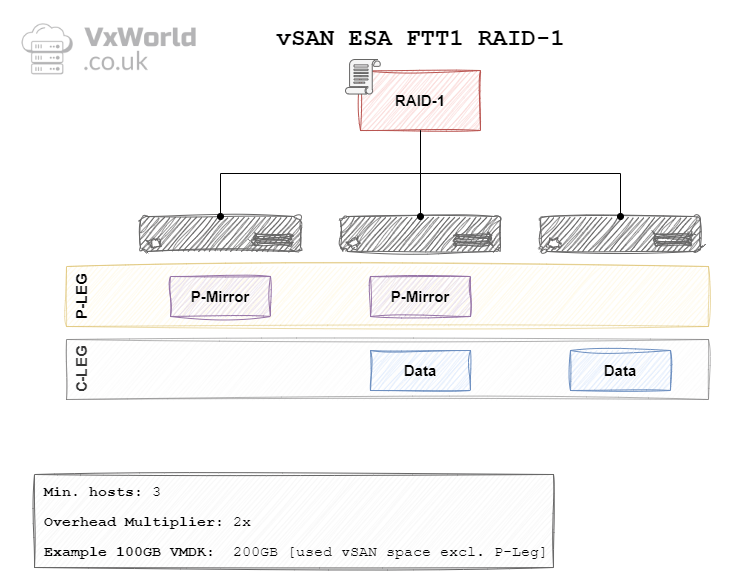
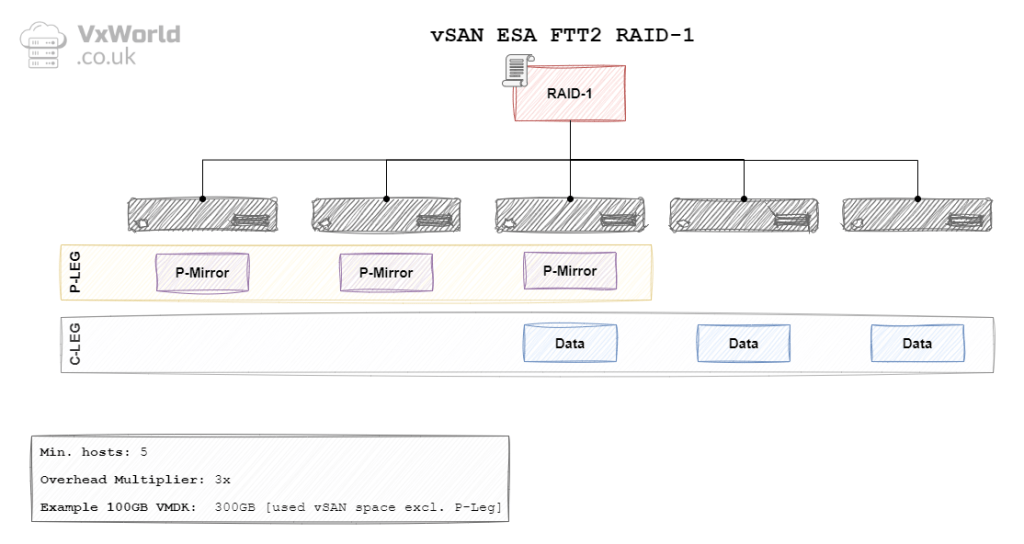
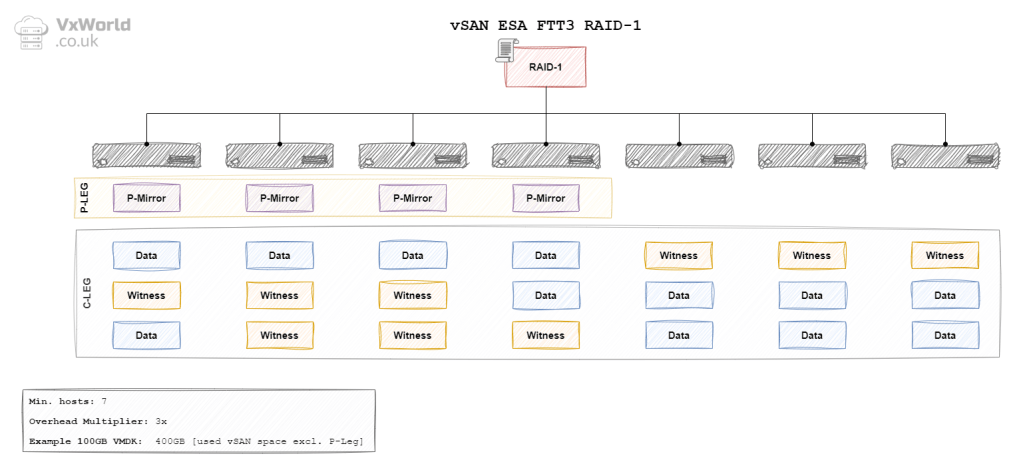
In the context of vSAN, the data is mirrored between hosts (fault domains). For a FTT of 1, the data will be mirrored across two hosts – requiring a minimum of three hosts. With a FTT of 2, the data will be mirrored across three hosts – requiring a minimum of five hosts. With a FTT of 3, data will be mirrored across fours hosts – requiring a minimum of seven hosts. The diagrams later in this post will depict the other components RAID 1 needs. It includes witness components in the case of OSA. In the case of ESA, it used the Performance leg in place of the witness components.
What is RAID 5
A quick reminder what RAID 5 is:
In RAID 5, data is striped (broken up) across multiple disks, but it also includes parity information, which is a form of error-checking data. This parity is distributed across all the drives in the array. In the event of a single disk failure, the data can be reconstructed using the parity information stored on the other disks.
ChatGPT
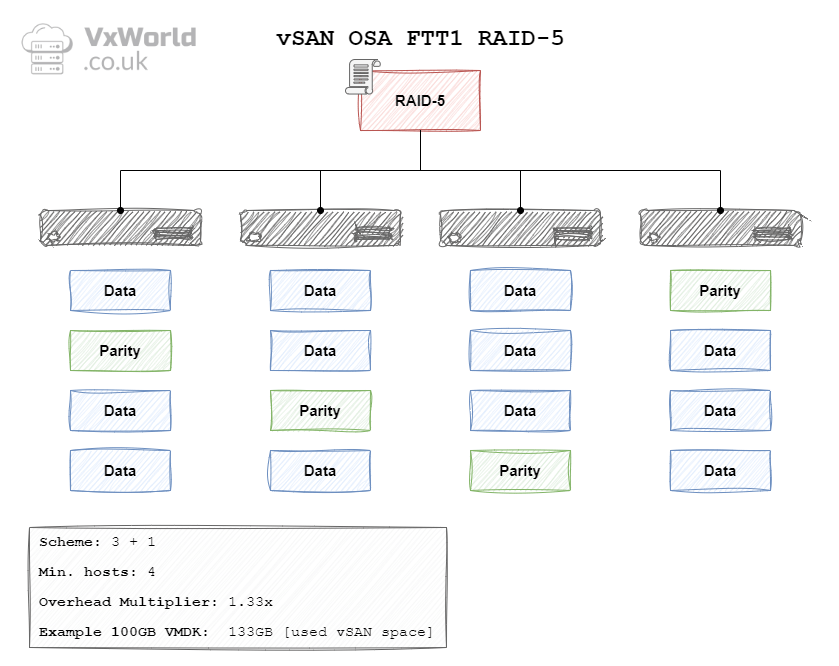
In the context of vSAN, the data is striped across hosts (fault domains). In vSAN OSA the data is striped in a 3 + 1 schema. Meaning each stripe would have three data blocks and one parity block. As a result, a minimum of four hosts (fault domains) are needed.
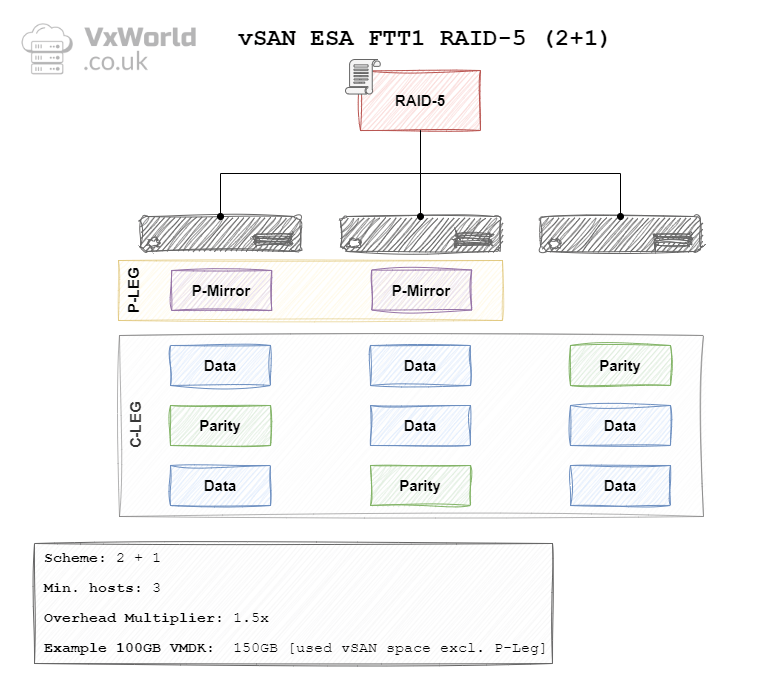
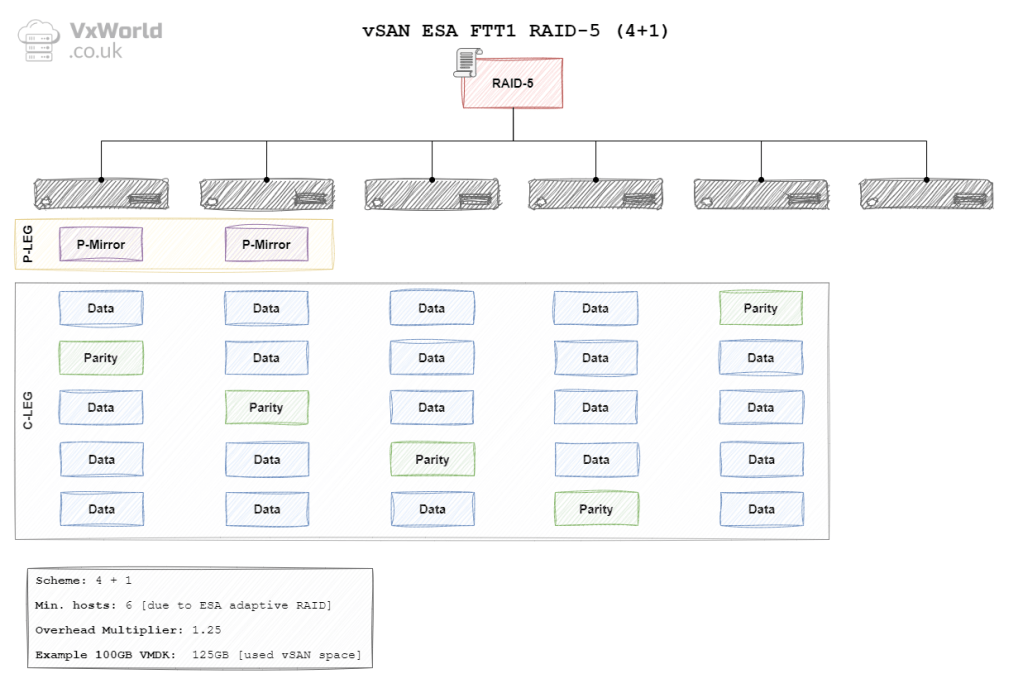
In vSAN ESA the data is striped using either a 2 + 1 or a 4 + 1 schema. Meaning each stripe would have two or four data blocks and one parity block respectively. This leads to the question of why two schemas?
ESA has the concept of Adaptive RAID 5. vSAN will automatically use the most appropriate RAID schema depending on the size of your cluster. Providing the ability to use RAID 5 on smaller clusters and realise overhead savings on larger clusters. For a 2 + 1 schema, the minimum number of hosts (fault domains) is 3. For a 4 + 1 schema, it is 6. No, that’s not a typo it is definitely 6 not 5! If your cluster size changes, vSAN will wait 24 hours. Then, it will change the schema to the most appropriate one. For more details read Duncan’s blog, vSAN 8.0 ESA – Introducing Adaptive RAID-5 | Yellow Bricks
What is RAID 6
A quick reminder what RAID 5 is:
In RAID 6, data is striped (broken up) across multiple disks, similar to RAID 5, but it includes two sets of parity information for error-checking and data reconstruction. These two parity blocks are distributed across all the drives in the array. In the event of up to two disk failures, the data can still be reconstructed using the double parity information stored on the remaining drives, providing enhanced fault tolerance compared to RAID 5.
ChatGPT
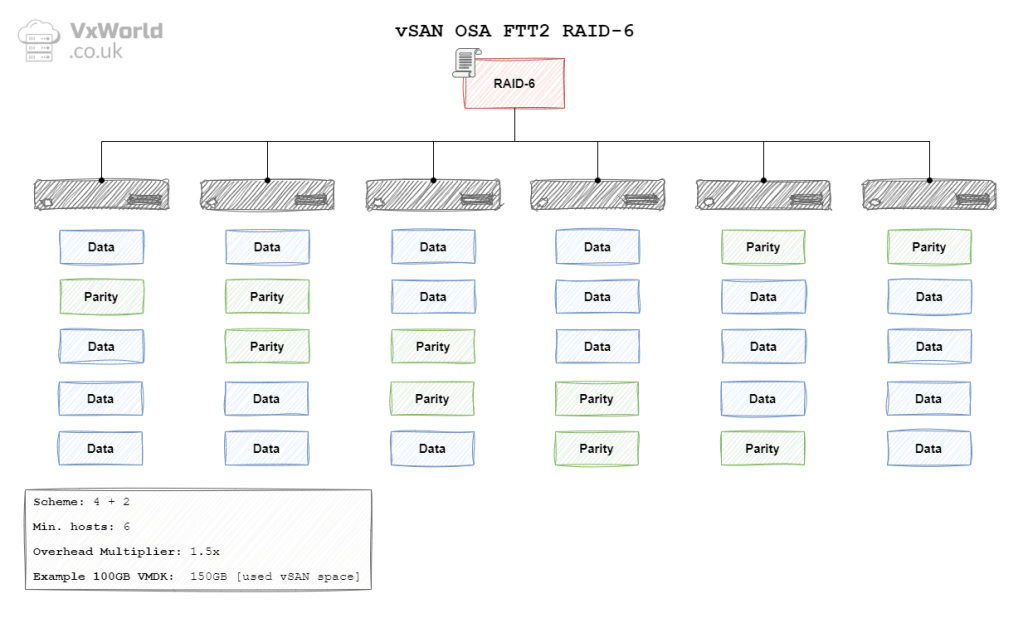
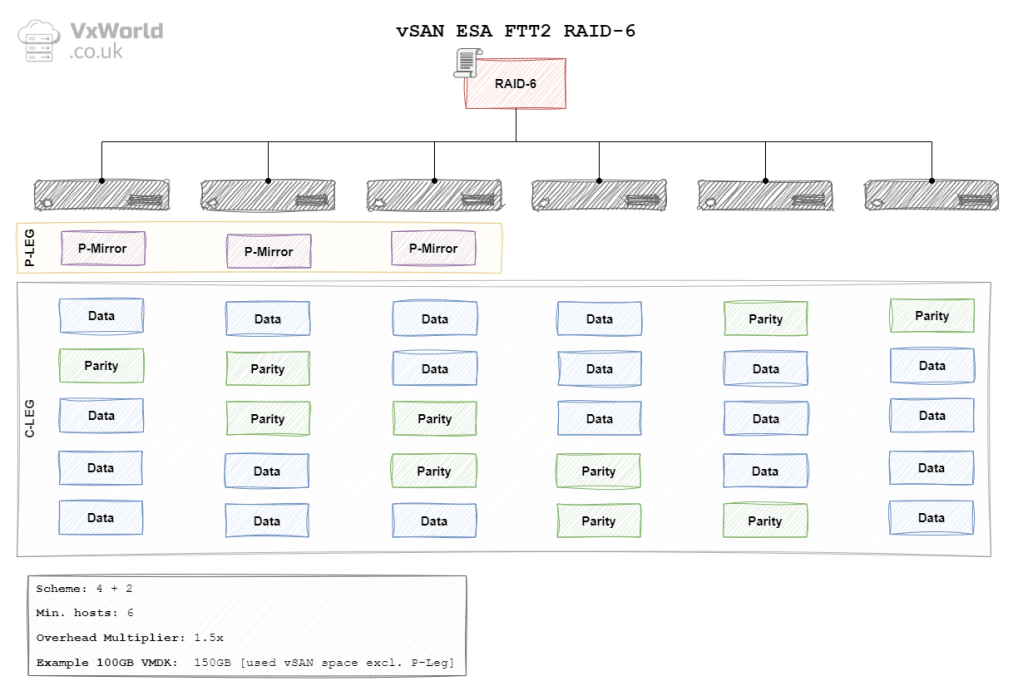
In the context of vSAN, the data is striped across hosts (fault domains). In vSAN ESA and OSA the data is striped using either a 4 + 2 schema. Meaning each stripe would have four data blocks and two parity blocks. As a result, a minimum of six hosts (fault domains) are needed.
OK, now we have covered some background, let’s get into what this post is about! How does your Storage Policy selection impact data placement? How does it affect the minimum number of hosts (fault domains)? How does it influence the amount of consumed raw storage?
Required Hosts
The table below summarises the minimum number of hosts each Storage Policy requires. It also details the impact on raw storage, displaying the RAID overhead multiplier and an example based on a 100 GB file.
| Architecture | Failures To Tolerate | RAID Policy | Min. No. Hosts | Multiplier | 100 GB Example |
|---|---|---|---|---|---|
| OSA | 1 Failure (Mirroring) | RAID 1 | 3 | 2 x | 200 GB |
| OSA | 2 Failure (Mirroring) | RAID 1 | 5 | 3 x | 300 GB |
| OSA | 3 Failure (Mirroring) | RAID 1 | 7 | 4 x | 400 GB |
| OSA | 1 Failure (Erasure Coding) | RAID-5 (3+1) | 4 | 1.33 x | 133 GB |
| OSA | 2 Failure (Erasure Coding) | RAID-6 (4+2) | 6 | 1.5 x | 150 GB |
| ESA | 1 Failure (Mirroring) | RAID 1 | 3 | 2 x | 200 GB |
| ESA | 2 Failure (Mirroring) | RAID 1 | 5 | 3 x | 300 GB |
| ESA | 3 Failure (Mirroring) | RAID 1 | 7 | 4 x | 400 GB |
| ESA | 1 Failure (Erasure Coding) | RAID-5 (2+1) | 3 | 1.5 x | 150 GB |
| ESA | 1 Failure (Erasure Coding) | RAID-5 (4+1) | 6 | 1.25 x | 125 GB |
| ESA | 2 Failure (Erasure Coding) | RAID-6 (4+2) | 6 | 1.5 x | 150 GB |
Calculating the minimum number of hosts
There is a simple way to calculate the minimum number of hosts required RAID 1 for each FTT. This works for both OSA and ESA.
(FTT x 2) + 1 = Minimum Number of Hosts
For example, if you want to use RAID 1 and be able to sustain one failure. The minimum number of hosts is 3.
(1 x 2) + 1 = 3 Hosts
Unfortunately I have not found a calculation that works for RAID 5 and RAID 6. RAID 6 is easy to remember as it needs 6 hosts – this is true for both OSA and ESA. However, RAID 5 requires you to remember the number of required hosts. However, I found the diagrams below useful for that, as I can picture them in my head.
ESA Auto-Policy Management
If you want to use vSAN ESA Auto-Policy Management, this changes the minimum number of host required for different Failure to Tolerate. The table below summarises the minimum number of hosts each Storage Policy requires. It also details the impact on raw storage, displaying the RAID overhead multiplier and an example based on a 100 GB file.
Standard vSAN clusters (with Host Rebuild Reserve turned off)
| No. Hosts | Failures To Tolerate | RAID Policy | Multiplier | 100 GB Example |
|---|---|---|---|---|
| 3 | 1 Failure (Mirroring) | RAID 1 | 2 x | 200 GB |
| 4 | 1 Failure (Erasure Coding) | RAID-5 (2+1) | 1.5 x | 150 GB |
| 5 | 1 Failure (Erasure Coding) | RAID-5 (2+1) | 1.5 x | 150 GB |
| 6 (or more) | 2 Failure (Erasure Coding) | RAID-6 (4+2) | 1.5 x | 150 GB |
Standard vSAN clusters (with Host Rebuild Reserve turned on)
| No. Hosts | Failures To Tolerate | RAID Policy | Multiplier | 100 GB Example |
|---|---|---|---|---|
| 3 | HRR not supported with 3 hosts | |||
| 4 | 1 Failure (Mirroring) | RAID 1 | 2 x | 200 GB |
| 5 | 1 Failure (Erasure Coding) | RAID-5 (2+1) | 1.5 x | 150 GB |
| 6 | 1 Failure (Erasure Coding) | RAID-5 (4+1) | 1.25 x | 125 GB |
| 7 (or more) | 2 Failure (Erasure Coding) | RAID-6 (4+2) | 1.5 x | 150 GB |
vSAN Stretched clusters provide site level mirroring. The below are the required number of hosts at each site. This is know as secondary failures to tolerate. Note: the 100GB example is for one site, it will be double this for the entire vSAN storage pool due to site mirroring.
| No. hosts at each site | Secondary Failures To Tolerate | RAID Policy | Multiplier | 100 GB Example |
|---|---|---|---|---|
| 3 | 1 Failure (Mirroring) | RAID-1 | 2 x | 200 GB |
| 4 | 1 Failure (Erasure Coding) | RAID-5 (2+1) | 1.5 x | 150 GB |
| 5 | 1 Failure (Erasure Coding) | RAID-5 (2+1) | 1.5 x | 150 GB |
| 6 (or more) | 2 Failure (Erasure Coding) | RAID-6 (4+2) | 1.5 x | 150 GB |
If you want more information check out the Auto-Policy Management Capabilities with the ESA in vSAN 8 U1 – VMware Cloud Foundation (VCF) Blog post by Pete Koehler.
Data Placement
In the final part of this post, I have added all the diagrams for each Storage Policy. Each diagram shows how the data is distributed across the hosts. It also summarizes the key information, including Minimum Number of Hosts*, Overhead Multiplier, and 100GB VMDK example.
*Please re-read the What is a Fault Domain section. This will remind you how this would look across server racks, for example.
OSA Data Placement
Original Storage Architecture Data Placement.
OSA RAID 1 FTT1
OSA RAID 1 FTT2

OSA RAID 1 FTT3

OSA RAID 5 FTT1
OSA RAID 6 FTT2
ESA Data Placement
Express Storage Architecture data placement.
ESA RAID 1 FTT1
ESA RAID 1 FTT2
ESA RAID 1 FTT3
ESA RAID 5 FTT1 (2+1)
ESA RAID 5 FTT1 (4+1)
ESA RAID 6 FTT2
Conclusion
I hope you have found this post useful. Good luck if you are studying for the VMware Certified Specialist – vSAN 2024 [v2] certification.
If you have any questions or comments please post them in the comments section below.

















 VxWorld
Leave a comment