
Having recently sat and passed the Advanced Deploy VMware vSphere® 7.x (3V0-22.21N) exam, I thought I would share my experience and tips. At time of writing (October 2024) this is the most recent version of the vSphere Advanced Deploy exam ,i.e., there is not one for vSphere 8.
On passing this exam, you are awarded with the VMware Certificated Advanced Professional – Data Center Virtualization Deploy 2024 [v2] certification. This is also known as the VCAP-DCV Deploy 2024 certification.
VMware describe the certification as:
The VMware Certified Advanced Professional – Data Center
Virtualization Deploy 2024 (VCAP-DCV Deploy 2024) certification
validates an individual’s advanced skills in deploying complex
vSphere solutions, including storage, networking, security, high
availability, and disaster recovery. Job-roles associated with this
certification include senior administrators, integrators, and advanced
support staff
The exam consists of 17 questions, with 205 minutes to finish it. If you decide to undertake the exam as a remote proctored exam, your total time is just under 4 hours. This includes the 30 minutes check-in time. Please read my post on Tips for Taking Remote Exams Successfully if you want more information on remote proctored exams.
This is one of the most interesting, engaging yet intensive exam I have done. Unlike most VMware exams that are multiple choice, this one is practical. When the exam starts, you will see a virtual lab environment. Letting you undertake configuration and troubleshooting tasks within a ‘real’ environment.
The VCAP-DCV Deploy Certification Preparation Guide provides details about the requirements and routes that lead to the VCAP-DCV Deploy certification. Although, after Broadcom’s acquisition of VMware, I would recommend reviewing their website VMware Certified Advanced Professional – Data Centre Virtualization Deploy 2024 (broadcom.com) also as it looks to contain the most up-to-date requirements.
In short, Broadcom have removed lots of the prerequisite requirements, with most routes just requiring you pass the 3V0-22.21N exam. However, if you already hold the VCAP-DCV Deploy 2023 certification, you can upgrade it to the 2024 certification. You can do this by attending a qualifying course (except below) or sitting the 3V0-22.21N exam.
VMware vSphere: Advanced Administration [V8]
VMware vSphere: Operate, Scale and Secure [V8]
VMware vSphere: Operate, Scale and Secure [V8] – On Demand
VMware vSphere: Optimize and Scale [V7]
VMware vSphere: Optimize and Scale [V7] – On Demand
VMware vSphere: Security [V8] – On Demand
VMware vSphere: Troubleshooting [V7]
VMware vSphere: Troubleshooting [V8]
VMware vSphere: Troubleshooting [V8] – On Demand
Preparing for the exam
The Exam Guide (Formally known as the Exam Blueprint) provides details as to all the objectives tested within the exam. In line with all other VMware exams the objectives cover the seven standardised sections. However, not all are tested in this exam. For example there are no objectives for the Products and Solutions or Planning and Designing sections sections within this exam.
I can’t recommend strongly enough reviewing the Exam Guide in detail. At first glance, it can seem daunting. Break it down, highlight what you know and areas requiring further study. The focus this provides is invaluable.
Make sure you study the references. For previous exams I have skimmed these and not given them the attention they deserve! As noted in the Exam Guide, the exam writers use these resources to write the exam questions.
…item writers use the following references for information when writing exam questions. It is recommended that you study the reference content as you prepare to take the exam, in addition to any recommended training.
As already mentioned, this is a practical, hands on exam. I highly recommend using the VMware Hands On Labs (HOL). You should try them if you are not already familiar with them. It’s free!
Whilst the test environment is not exactly the same, this will give you a feel for how the lab operates. For example, practice copy and pasting from the instructions to within the lab. Get used to navigating the user interface. Learn to work with a lag on the user interface. This exposure will save you time in the exam and help take some of the pressure off.
If you cannot find a lab that align with an objectives you need to study. Find one that provides the components you need to learn (e.g. vSAN). You can deviate from the lab so make the most of the environment!
I recommend playing some of the HOL Odyssey games/labs (you need to be logged in to see them). VMware Odyssey is set up like a game where you take on different challenges within a VMware environment. This will give you a feel for doing tasks without step by step instructions and against a timer.
VMware recommend the Advanced Deploy VMware vSphere 7.x Practice Exam as a prerequisite to the exam. This practice exam provides a lab environment and several tasks. You have longer in this lab than the real exam so it could be beneficial in validating your exam readiness. I have not done tried them myself so I can’t comment on how good they are. Personally I use VMware daily so decided to go straight for doing the exam with very little prep or practice. This decision was easier because Broadcom reduced the exam price from $450 to $250. So, in my head, I considered it a practice exam which helped take the pressure off.
Tips during the exam
When the exam starts, once the lab loads and you are faced with a desktop, the time will fly! One of the key elements of the exam is time management. You will need to start a question, leave it doing something, move on and come back to it several questions later.
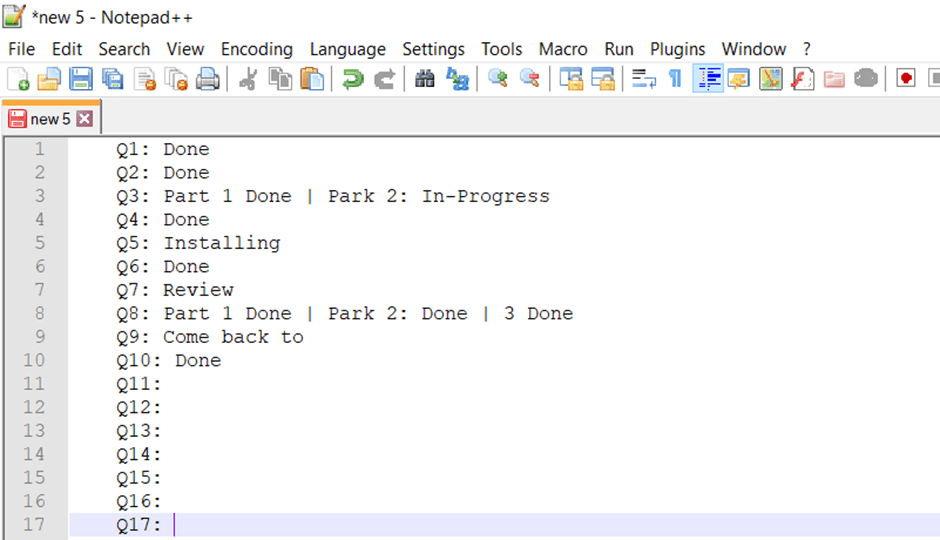
On starting my exam, I fired up Notepad++ and listed all questions in short hand. This allowed me to track my progress on each question as I progressed though the exam.
Below is a mocked up example of what this looked like for me.
You have access to key resources with the lab environment. Spend a few minutes at the start to familiarise yourself with these. This will help you know when there is a document you can refer to aid you.
Summary
To summaries my tips:
- My number one tip must be to review Exam Guide (Formally known as the Exam Blueprint). Make sure you study the references! As noted in the Exam Guide, the exam writers use these resources to write the exam questions.
- Note down the parts of the Exam Guide Objectives and References you are unfamiliar with. Focus your study on those parts.
- If you are doing the exam as a Remote Proctored exam, review my blog post Tips for Taking Remote Exams Successfully.
- Take advantage of VMware Hands On Labs (HOL) – its free!
- If you can’t find a lab that align with an objective you need to study. Find one that provides the components you need to learn (e.g. vSAN). You can deviate from the lab so make the most of the environment!
- If you will be doing a remote proctored exam, use the HOL to get a the feel with your equipment.
- Practice copy and pasting from the instructions to within the lab. This prevents you mistyping information
- Try an Odyssey HOL. These are timed games that give you a feel for being given a task and needing to solve it within a time constraint
- Consider if the Advanced Deploy VMware vSphere 7.x Practice Exam would help you.
- Review the resources provided within the lab. This will help you know when there is a document you can refer to aid you.
- Time management is extremely important, use notepad(++) to make notes as you go to track your progress.
- Do not wait for a process to finish! You will need to jump back and forth between questions.
- Move on if you get stuck or read a question you know you know nothing about! If you have time at the end, then come back to it.
I hope this post provides some insight and give you the confidants to attempt the Advanced Deploy VMware vSphere® 7.x (3V0-22.21N) exam and achieve the associated VMware Certificated Advanced Professional – Data Center Virtualization Deploy 2024 [v2] certification. If you have any tips to share, please add a comment to this post.
Best of luck with the exam.







 VxWorld
Leave a comment